MC_Stop (FB)
FUNCTION_BLOCK MC_Stop
This function block commands a controlled motion stop and transfers the axis to the state “Stopping”.

Note
MC_Stop can not be aborted by another command. It can be aborted only by another MC_Stop function block
It aborts any ongoing function block execution. While the axis is in state Stopping, no other function block can perform any motion on the same axis. After the axis has reached velocity zero, the Done output is set to TRUE immediately. The axis remains in the state “Stopping” as long as Execute is still TRUE or velocity zero is not yet reached. As soon as “Done” is TRUE and “Execute” is FALSE the axis goes to state “STANDSTILL”.
- Example
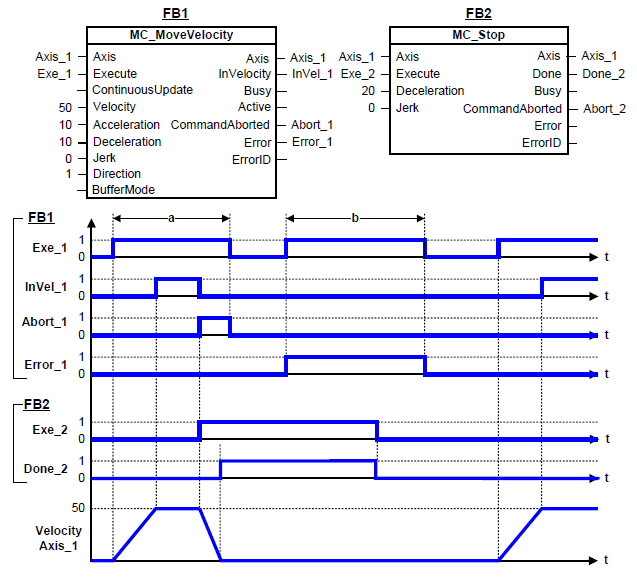
Behavior of MC_Stop in combination with MC_MoveVelocity
A rotating axis is ramped down with function block MC_Stop.
The axis rejects motion commands as long as MC_Stop parameter Execute = TRUE. Function block MC_MoveVelocity reports an error indicating the busy MC_Stop command.
- InOut:
Scope
Name
Type
Comment
Input
ExecuteBOOLStarts the function block at rising edge
DecelerationLREAL[u/s°°2] Value of the deceleration (decreasing energy of the motor). Range: >0. If value = 0, Deceleration will be equal to parameter paraMaxDecelerationAppl.If value > 0 and <= 1,Deceleration will be limited to 1.
JerkLREAL[u/s°°3] Value of the jerk. Range: >=-1.
Use jerk= 0 to disable jerk interpolation. This will result in a constant deceleration during the stop.Use jerk=-1 for automatic jerk calculation. This will create a triangle-shaped decelerationBufferModeNot supported, default mcABORTING used
Output
DoneBOOLShows the status of the function block. Done = TRUE if the execution is finished
BusyBOOLThe function block is not finished
ActiveBOOLIndicates that the function block has control on the axis
CommandAbortedBOOLCommand is aborted by another command from other PLCopen function block
ErrorBOOLSignals that error has occurred within function block
ErrorIDError identification. For error details refer to Enumeration ERROR_ID
Inout
AxisReference to axis