MC_MoveVelocity (FB)
FUNCTION_BLOCK MC_MoveVelocity
This function block commands a never ending controlled motion at a specified velocity.

Note
To stop the motion, the function block has to be interrupted by another function block issuing a new command.
The signal “InVelocity” is set when the commanded velocity equals the velocity input.
The signal “InVelocity” has to be reset when the block is aborted by another block.
In combination with MC_MoveSuperimposed, the output “InVelocity” stays TRUE once the velocity setpoint of the axis has reached the commanded velocity.
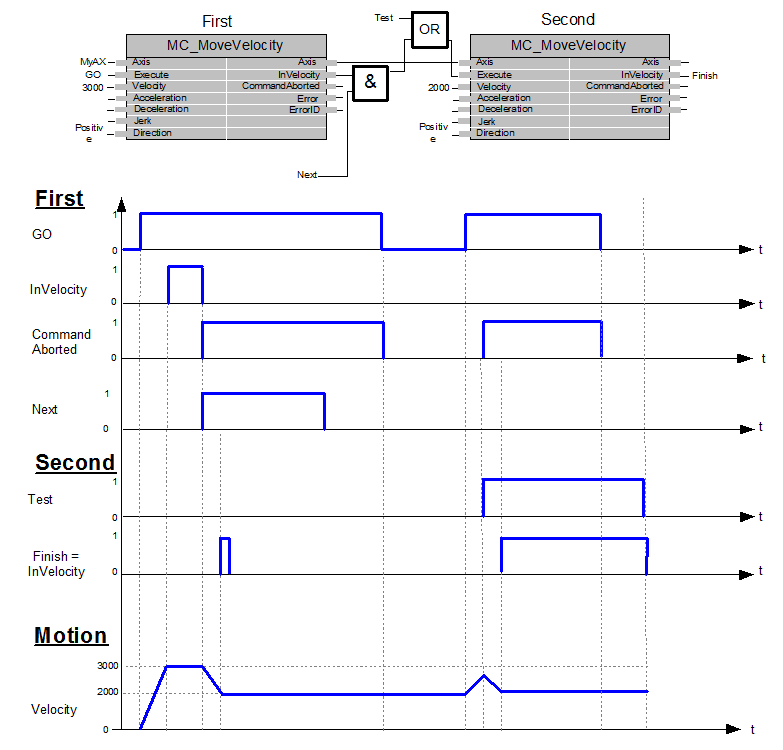
- Examples of the combination of two Function Blocks MC_MoveVelocity
1. The left part of timing diagram illustrates the case if the second function block is called after the first one is completed. If first reaches the commanded velocity 3000 then the output First.InVelocity AND the signal Next causes the second function block to move to the velocity 2000.
2. The right part of the timing diagram illustrates the case if the second function block starts the execution while the first function block is not yet InVelocity. The following sequence is shown: The first motion is started again by Go at the input First.Execute. While the first function block is still accelerating to reach the velocity 3000 the first function block will be interrupted and aborted because the test signal starts the Run of the second function block. Now the second function block runs and decelerates the velocity to 2000.
Note
Input validation is done at the rising edge of Execute. If function block is in Active/Busy state, new value at the input will be validated on the next rising edge of Execute. If the Input values are invalid, function block will stop execution with an error.
Note
If there is no configuration done at the input Direction or Axis_Parameter.paraReverseDirection, by default movement will start in the counter clockwise direction.
- InOut:
Scope
Name
Type
Comment
Input
ExecuteBOOLStarts the function block at rising edge
VelocityLREAL[u/s] Value of the maximum velocity (not necessarily reached). Range: >=0
AccelerationLREAL[u/s°°2] Value of the acceleration (increasing energy of the motor). Range: >0. If value = 0, Acceleration will be equal to parameter paraMaxAccelerationAppl.If value > 0 and <= 1,Acceleration will be limited to 1.
DecelerationLREAL[u/s°°2] Value of the deceleration (decreasing energy of the motor). Range: >0. If value = 0, Deceleration will be equal to parameter paraMaxDecelerationAppl.If value > 0 and <= 1,Deceleration will be limited to 1.
JerkLREAL[u/s°°3] Value of the jerk. Range: >=0
Direction- Direction input: Positive, Negative, Current
If there is no configuration done at input Direction or Axis_Parameter.paraReverseDirection, by default movement will start in counter clockwise direction
BufferModeNot supported, default mcABORTING used
Output
InVelocityBOOLCommanded velocity is reached
BusyBOOLThe function block is not finished
ActiveBOOLIndicates that the function block has control on the axis
CommandAbortedBOOLCommand is aborted by another command from other PLCopen function block
ErrorBOOLSignals that error has occurred within function block
ErrorIDError identification. For error details refer to Enumeration ERROR_ID
Inout
AxisReference to axis