MC_AccelerationProfile (FB)
FUNCTION_BLOCK MC_AccelerationProfile
This function block commands a time-acceleration locked motion profile.

Note
Alternatively to this function block, the CAM function block coupled to a virtual master can be used.
- Example of an acceleration profile
A profile is made from a number of sequential “A to B” positioning points. It is simple to visualize, but requires a lot of sequences for a smooth profile. These requirements are often beyond the capability of low-end servos. Alternatively, by using a modest amount of constant acceleration segments it is possible to define a well-matching motion profile. With this method the capability range of low-end servos can be extended. It is possible to make matching to either:
Position versus time profile
Master versus slave axis
- Advantages
Compact description of a profile.
Smooth profile properties by nature.
Low processor power requirements.
- Disadvantages
Higher programming abstraction level with existing tools.
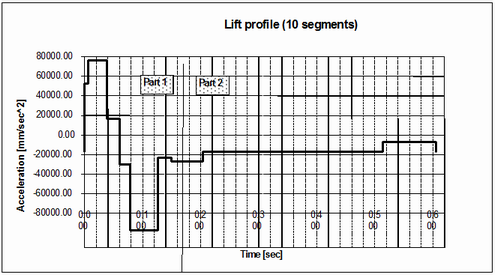
Acceleration profile, 10 segments only
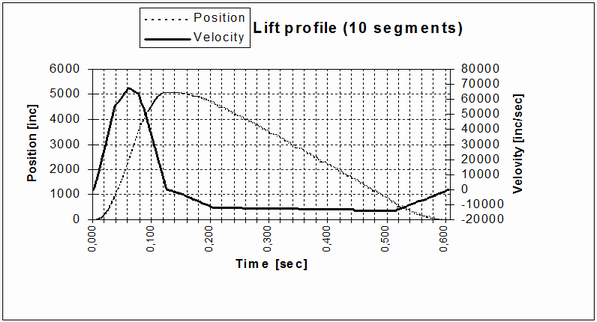
Resulting position profile
Note
MC_TProfile is an ABB specific datatype.
Note
When Done = TRUE (profile is completed), Axis will run with the last Velocity value.
- InOut:
Scope
Name
Type
Initial
Comment
Input
ExecuteBOOLStarts the function block at rising edge
TimeScaleLREAL1
Overall time scaling factor of the profile. Range: >0
AccelerationScaleLREAL1
Scale factor for acceleration amplitude. Range: AccelerationScale <> 0
OffsetLREAL0
Overall offset for profile, the profile result will be increased by Offset
Number_Of_PairsINTNumber of sampling points, elements in TimeAcceleration array. Range: >=2
iType- Type of interpolation. Possible values are:
MCA_SPLINE_COMPLETE
MCA_SPLINE_NATURAL
MCA_POLY5
MCA_POLY3
MCA_LINEAR
TimeAccelerationPOINTER TO MC_TProfile
Reference to Time / Acceleration
BufferModeNot supported, default mcABORTING used
Output
DoneBOOLShows the status of the function block. Done = TRUE if the execution is finished
BusyBOOLThe function block is not finished
ActiveBOOLIndicates that the function block has control on the axis
CommandAbortedBOOLCommand is aborted by another command from other PLCopen function block
ErrorBOOLSignals that error has occurred within function block
ErrorIDError identification. For error details refer to Enumeration ERROR_ID
Inout
AxisReference to axis