MC_MoveSuperImposed (FB)
FUNCTION_BLOCK MC_MoveSuperImposed
This function block commands a controlled motion of a specified relative distance additional to an existing motion. The existing Motion is not interrupted, but is superimposed by the additional motion.

If MC_MoveSuperImposed is active, then any other command in aborting mode except MC_MoveSuperImposed will abort both motion commands: Both the MC_MoveSuperImposed and the underlying motion command. In any other mode, the underlying motion command is not aborted
If MC_MoveSuperImposed is active and another MC_MoveSuperImposed is commanded, only the ongoing MC_MoveSuperImposed command is aborted, and replaced by the new MC_MoveSuperImposed, but not the underlying motion command
The function block MC_MoveSuperimposed causes a change of the velocity, if applicable, the commanded position of an ongoing motion in all relevant states
In the state StandStill the function block MC_MoveSuperimposed acts like MC_MoveRelative.
The values of Acceleration, Deceleration and Jerk are additional values to the ongoing motion, not absolute ones. With this, the underlying function block always finishes its job in the same period of time regardless of whether a MC_MoveSuperimposed function block takes place concurrently
MC_MoveSuperimposed acts on the slave axis, while MC_Phasing acts on the master side, as seen from the slave.
- Timing diagram of MC_MoveSuperImposed
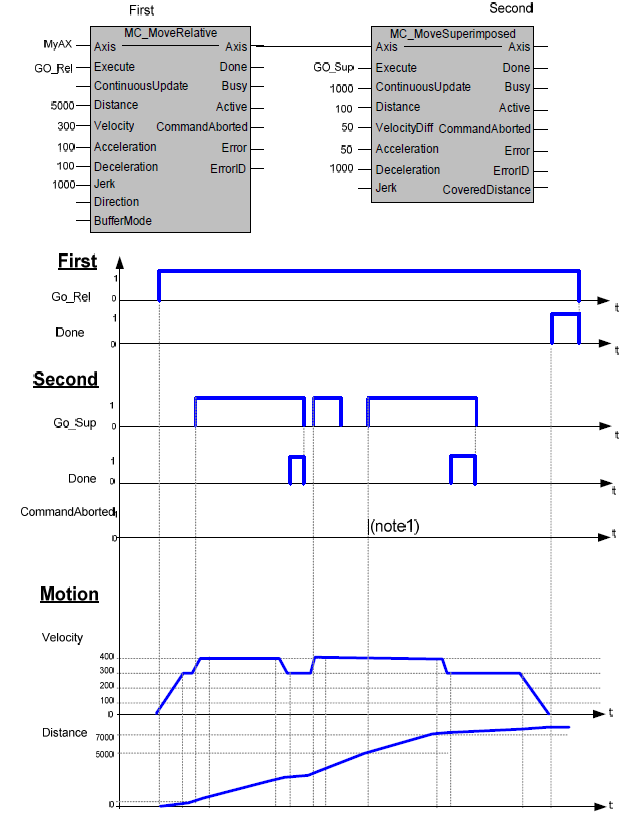
The CommandAborted is not visible here, because the new command works on the same instance
The end position is between 7000 and 8000, depending on the timing of the aborting of the second command set for the MC_MoveSuperimposed.
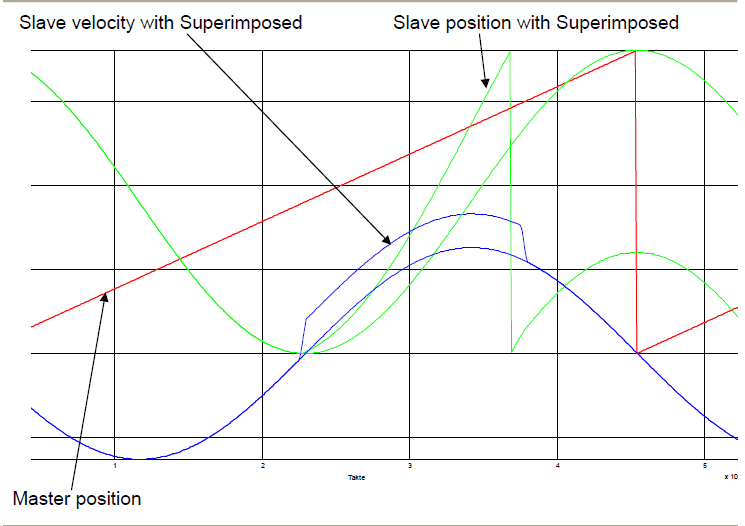
- Example of MC_MoveSuperimposed during Camming with modulo axes
In green color the slave position is shown both with and without MC_MoveSuperimposed
Note
At Slave velocity, the double line shows the effect of MoveSuperimposed while in Synchronized Motion during Camming. The same is valid for the related slave position.
- InOut:
Scope
Name
Type
Comment
Input
ExecuteBOOLStarts the function block at rising edge
DistanceLREAL[u] = technical unit, Relative distance for the motion. Range: Maximum range is 16#7FFFFFFF in increments, if configured in units, range will be limited to equivalent of 16#7FFFFFFF increments
VelocityDiffLREAL[u/s] Value of the maximum velocity difference to the ongoing motion (not necessarily reached)
AccelerationLREAL[u/s°°2] Value of the acceleration (increasing energy of the motor). Range: >0. If value = 0, Acceleration will be equal to parameter paraMaxAccelerationAppl.If value > 0 and <= 1,Acceleration will be limited to 1.
DecelerationLREAL[u/s°°2] Value of the deceleration (decreasing energy of the motor). Range: >0. If value = 0, Deceleration will be equal to parameter paraMaxDecelerationAppl.If value > 0 and <= 1,Deceleration will be limited to 1.
JerkLREAL[u/s°°3] Value of the jerk. Range: >=0
Output
DoneBOOLShows the status of the function block. Done = TRUE if the execution is finished
BusyBOOLThe function block is not finished
ActiveBOOLIndicates that the function block has control on the axis
CommandAbortedBOOLCommand is aborted by another command from other PLCopen function block
ErrorBOOLSignals that error has occurred within function block
ErrorIDError identification. For error details refer to Enumeration ERROR_ID
Inout
AxisReference to axis