MC_MoveRelative (FB)
FUNCTION_BLOCK MC_MoveRelative
This function block commands a controlled motion of a specified distance relative to the actual position at the time of the execution.

This action completes with velocity zero if no further action are pending.
- Example
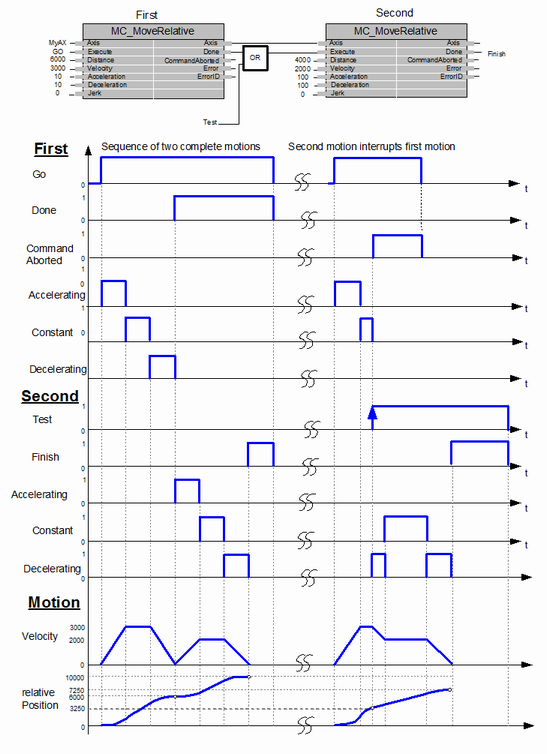
The following figure shows the example of the combination of two MC_MoveRelative function blocks:
1. The left part of timing diagram illustrates the case if the second function block is called after the first one. If the first one reaches the commanded distance 6000 (and the velocity is 0) then the output Done causes the second Function Block to move to the distance 10000.
2. The right part of the timing diagram illustrates the case if the second move function blocks starts the execution while the first function block is still executing. In this case the first motion is interrupted and aborted by the test signal during the constant velocity of the first function block. The second function block adds on the actual position of 3250 the distance 4000 and moves the axis to the resulting position of 7250.
- InOut:
Scope
Name
Type
Comment
Input
ExecuteBOOLStarts the function block at rising edge
DistanceLREAL[u] = Technical unit, Relative distance for the motion. Range: Maximum range is 16#7FFFFFFF in increments, if configured in units, range will be limited to equivalent of 16#7FFFFFFF increments
VelocityLREAL[u/s] Value of the maximum velocity (not necessarily reached). Range: >0
AccelerationLREAL[u/s°°2] Value of the acceleration (increasing energy of the motor). Range: >0. If value = 0, Acceleration will be equal to parameter paraMaxAccelerationAppl.If value > 0 and <= 1,Acceleration will be limited to 1.
DecelerationLREAL[u/s°°2] Value of the deceleration (decreasing energy of the motor). Range: >0. If value = 0, Deceleration will be equal to parameter paraMaxDecelerationAppl.If value > 0 and <= 1,Deceleration will be limited to 1.
JerkLREAL[u/s°°3] Value of the jerk. Range: >=0
BufferModeNot supported, default mcABORTING used
Output
DoneBOOLShows the status of the function block. Done = TRUE if the execution is finished
BusyBOOLThe function block is not finished
ActiveBOOLIndicates that the function block has control on the axis
CommandAbortedBOOLCommand is aborted by another command from other PLCopen function block
ErrorBOOLSignals that error has occurred within function block
ErrorIDError identification. For error details refer to Enumeration ERROR_ID
Inout
AxisReference to axis