MC_MoveContinuousAbsolute (FB)
FUNCTION_BLOCK MC_MoveContinuousAbsolute
This function block commands a controlled motion to a specified absolute position ending with the specified velocity.

If the commanded position is reached and no new motion command is put into the buffer, the axis continues to run with the specified “EndVelocity”.
The function block will start the axis with state DiscreteMotion, while positioning.
It will change to state Continuous Motion (meaning: it will not stop by itself) with EndVelocity <> 0.
It will change to standstill with EndVelocity = 0.
- One use case for MC_MoveContinuousAbsolute is a linear cutter. One linear axis that is carrying a laser device that is used to cut a workpiece
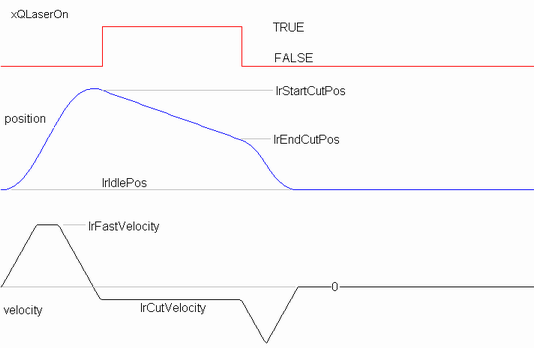
Start from lrIdlePos.

Move the laser with fast velocity over the position lrStartCutPos. The laser is off during this movement

Turn back and make sure to have the speed lrCutVelocity when at lrStartCutPos. At this position, switch the laser on

Travel over the work piece with this constant speed while the laser is on

When reaching lrEndCutPos switch off the laser and move back to idle position with fast velocity

During the cutting process the laser must be moved with a fix velocity, no acceleration or deceleration phase can be tolerated. The laser must be moved to its waiting position after the cutting is done
- Example
The explained movement can be achieved with the function block MC_MoveContinuousAbsolute in the following way:
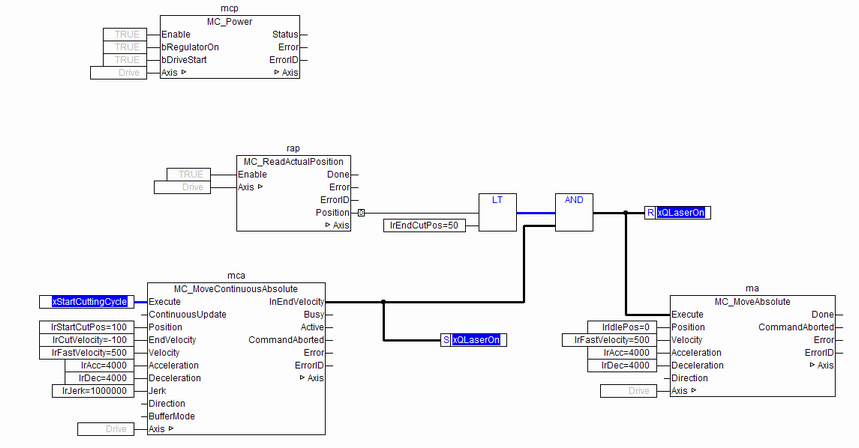
Started with a rising edge of xStartCuttingCycle, the instance “mca” of MC_MoveContinuousAbsolute will move the axis with “lrFastVelocity” over “lrStartCutPos”, turn back and have the speed “lrCutVelocity” when reaching “lrStartCutPos” again in negative direction. In this point in time, “InEndVelocity” is set and the laser is switched on. As no other motion function block interrupts this movement, MC_MoveContinuousAbsolute will keep travelling in negative direction with the current speed. After the axis has overstepped the position “lrEndPos”, where the laser is switched off, the MC_MoveAbsolute instance “ma” moves the axis with high speed to its idle position
Note
Input validation is done at the rising edge of Execute. If function block is in Active/Busy state, new value at input will not be validated. If value passed is invalid function block will continue execution with last valid value.
- InOut:
Scope
Name
Type
Comment
Input
ExecuteBOOLStarts the function block at rising edge
ContinuousUpdateBOOLDecide if new input parameters are processed during the movement
PositionLREAL[u] Reference position. Range: Maximum range is 16#7FFFFFFF in increments, if configured in units, range will be limited to equivalent of 16#7FFFFFFF increments
EndVelocityLREAL[u/s] Signed value for the end veloicty, determines the direction when ending the positioning movement
VelocityLREAL[u/s] Value of the maximum velocity (not necessarily reached). Range: >0
AccelerationLREAL[u/s°°2] Value of the acceleration (increasing energy of the motor). Range: >0,If value = 0, Acceleration will be equal to parameter paraMaxAccelerationAppl.If value > 0 and <= 1,Acceleration will be limited to 1.
DecelerationLREAL[u/s°°2] Value of the deceleration (decreasing energy of the motor). Range: >0,If value = 0, Deceleration will be equal to parameter paraMaxDecelerationAppl.If value > 0 and <= 1,Deceleration will be limited to 1.
JerkLREAL[u/s°°3] Value of the jerk. Range: >=0
DirectionPositive, Shortest, Negative, Current
BufferModeNot supported, default mcABORTING used
Output
InEndVelocityBOOLCommanded position finally reached
BusyBOOLThe function block is not finished
ActiveBOOLIndicates that the function block has control on the axis
CommandAbortedBOOLCommand is aborted by another command from other PLCopen function block
ErrorBOOLSignals that error has occurred within function block
ErrorIDError identification. For error details refer to Enumeration ERROR_ID
Inout
AxisReference to axis