MC_CamIn (FB)
FUNCTION_BLOCK MC_CamIn
This function block implements Camming functionality. A slave axis is coupled to a master axis by a position/position relation.

It is not required that the master is stationary.
If the actual master and slave positions do not correspond to the offset values when MC_CamIn is executed, either an error occurs or the system deals with the difference automatically.
The Cam is placed either absolute or relative to the current master and slave positions:
Absolute: The profile between master and slave is seen as an absolute relationship.
Relative: The relationship between master and slave is in a relative mode.
If a cam-table is to be used “relative”, the first position has to be zero.
This function block is not merged with the MC_CamTableSelect function block because this separation enables changes on the fly.
A mechanical analogy to a slave offset is a cam welded with additional constant layer thickness. Because of this the slave positions have a constant offset and the offset could be interpreted as axis offset of the master shaft, if linear guided slave tappets are assumed.
Note
The slave axis is NOT ramped out, which means the curve should end with velocity=0. The CAM could be interrupted with any other function block, according to the statemachine. It is not required to use MC_CamOut.
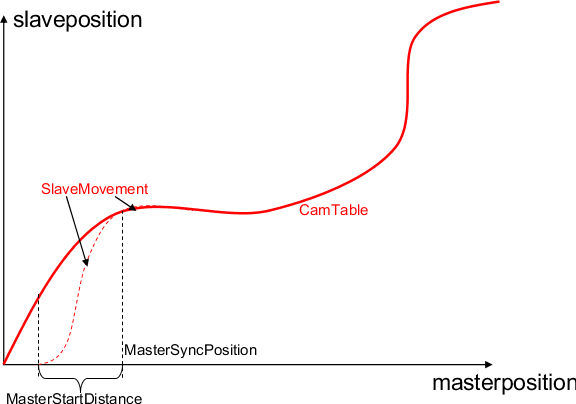
In case of “MasterStartDistance” >0, the Master axis must rotate in the positive direction for the slave to synchronize the cam points. The Slave axis won’t synchronize when the master rotates in a negative direction.
In case of “MasterStartDistance” <0, the Master axis must rotate in the negative direction for the slave to synchronize the cam points. The Slave axis won’t synchronize when the master rotates in a positive direction.
In case of “MasterStartDistance” =0, the master axis can rotate in the positive or negative direction since the slave immediately synchronizes the cam points on the rising edge of the “Execute” and parameter “MasterSyncPosition” is ignored. When the master did not yet reach a position in the cam area, the slave axis is stopped.
With MasterStartDistance <> 0 the slave axis needs to be in state StandStill when activating MC_CamIn. The function block will wait until the master axis reaches the position MasterSyncPosition - MasterStartDistance. The slave will then be started and be synchronized to the CAM table, to the position and velocity which is indicated by the master position MasterSyncPosition.
- The formula to get the master axis position where slave is started to move is:
When MasterStartDistance = 0 or input OffsetMode of MCA_CamStructureSelect is IgnoreMasterSync, MasterStartingPosition = MasterPositionBase, in which MasterPositionBase is the position of master axis when MCA_CamIn starts to execute.
- When MasterStartDistance <> 0 and input OffsetMode of MCA_CamStructureSelect is not 2,
If MasterAbsolute = True, MasterStartingPosition = MasterOffset + MasterSyncPosition - MasterStartDistance.
If MasterAbsolute = False, MasterStartingPosition = MasterPositionBase + MasterSyncPosition - MasterStartDistance, in which MasterPositionBase is the position of master axis when MCA_CamIn starts to execute.
- The formula to get the slave axis position is: Y = { Cam[ mod( (X - MasterOffset) * MasterScaling, CamMasterPeriod ) ] + SlaveOffset } * SlaveScaling - Y_Offset.
If MasterAbsolute = True, X = MasterPosition, if MasterAbsolute = False, X = MasterPosition - MasterStartingPosition, in which MasterStartingPosition is the position of master axis where slave starts to move.
If SlaveAbsolute = True, SlavePosition = Y, if SlaveAbsolute = False, SlavePosition = Y + SlavePositionBase, in which SlavePositionBase is the position of slave axis when MCA_CamIn starts to execute.
When input OffsetMode of MCA_CamStructureSelect is Default or IgnoreMasterSync, Y_Offset = 0.
- When input OffsetMode of MCA_CamStructureSelect is SlaveRelative,
If MasterAbsolute = True, Y_Offset = { Cam[ mod( (MasterStartingPosition - MasterOffset) * MasterScaling, CamMasterPeriod ) ] + SlaveOffset } * SlaveScaling.
If MasterAbsolute = False, Y_Offset = { Cam[ mod( (0 - MasterOffset) * MasterScaling, CamMasterPeriod ) ] + SlaveOffset } * SlaveScaling.
When MasterAbsolute = True and axis type of master axis is modulo or finite, the value of MasterScaling that makes MasterModuloRange * MasterScaling is an integer multiple of CamMasterPeriod can be accepted.
Note
The MC_CamIn has parameters to scale the cam-table values (MasterScaling, SlaveScaling). It has to be considered that MasterOffset and SlaveOffset are scaled exactly like the corresponding cam-table values. The MasterSyncPosition and MasterStartDistance are not scaled at all, these positions are related to the actual master position whereas the MasterOffset and SlaveOffset are related to the camtable. New set of values at inputs MasterOffset, SlaveOffset, MasterScaling, SlaveScaling will be accepted only after the function block is aborted and fresh rising edge is provided at Execute input.
Note
The default behavior of this function block can be modified by the inputs in function MCA_Cam_Extra
Note
A negative MasterScaling requires backward master movement, when combined with MasterOffset. The MasterScaling also applies to the MasterOffset. Behaviour results from the requirement to have ascending master values in CamTable.
Note
User can utilize CAM editor in Automation builder to generate Cam table (MC_PProfile) automatically. For more details refer to Automation builder help.
- InOut:
Scope
Name
Type
Initial
Comment
Input
ExecuteBOOLStarts the function block at rising edge
MasterOffsetLREAL0
Offset of master table. Angular offset of the master shaft to Cam. Actual position - MasterOffset will be used to sample the CamTable
SlaveOffsetLREAL0
Offset of slave table. Sharpened cam (i.e higher elevation and deeper depression). Use the result from CamTable + SlaveOffset as reference position
MasterScalingLREAL1
Scaling factor for master positions in CamTable. From the slave point of view the master overall profile is multiplied by this factor. Just values >0 are allowed
SlaveScalingLREAL1
Scaling factor for slave positions from CamTable. The overall slave profile is multiplied by this factor. Just values >0 are allowed
MasterSyncPositionLREALSlave axis should be synchronized to CamTable when master axis reaches MasterSyncPosition
MasterStartDistanceLREAL0
If 0 : Start with rising edge of execute, >0 : Wait for MasterSyncPosition - MasterStartDistance to start the CamTable, master must rotate in the positive direction to sync , <0: Wait for MasterSyncPosition - MasterStartDistance to start the CamTable, Master must rotate in the negative direction to sync.
MasterValueSourceDefines the source for synchronization: mcSetValue - Synchronization on master set value. mcActualValue - Synchronization on master actual value
SyncDirectionMoving direction for the slave to start the movement. Applicable: POSITIVE or NEGATIVE, use SHORTEST for any other value
SyncWindowLREAL- [u], Used to determine the moving direction, combined with SyncDirection
When the slave is outside the SyncWindow, it will move the direction which is given in SyncDirection
When the slave is inside the SyncWindow, it will move SHORTEST to meet the SlaveSyncPosition
BufferModeNot supported, default mcABORTING used
Output
InSyncBOOLSlave is synchronized to CamTable
DoneBOOLShows the status of the function block. Done = TRUE if the execution is finished
BusyBOOLThe function block with Busy = TRUE has control on the axis
ActiveBOOLIndicates that the function block has control on the axis
CommandAbortedBOOLCommand is aborted by another command from other PLCopen function block
ErrorBOOLSignals that error has occurred within function block
ErrorIDError identification. For error details refer to Enumeration ERROR_ID
EndOfProfileBOOLPulsed output signaling the cyclic end of the CAM profile. It is displayed every time when the end of CAM profile is reached. In reverse direction, the ‘EndOfProfile’ is displayed also at the end of the cam profile (in this case the first point of the cam profile)
Inout
MasterReference to master axis
SlaveReference to slave axis
CamTableIDIdentifier of CAM Table to be used in the MC_CamIn function block. Prepared by MC_CamTableSelect