


Symbol: 
A macro contains a part of the SFC chart which is not shown in detail in the main view of the editor.
Using macros does not influence the processing flow. Macros are used to hide specific parts of the chart, for example to increase overall clarity.
To open the macro editor, double-click the macro box or click “SFC Zoom into Macro”. You can program here just like in the main view of the SFC editor. To close the macro editor, click “SFC Zoom out of Macro”.
For more information, see: ⮫ “Programming in SFC ”, ⮫ “Creating a POU in SFC ”, ⮫ “Adding a step-transition ”, ⮫ “Adding an entry action ”, ⮫ “Adding an exit action ”, ⮫ “Adding an action ”, ⮫ “Adding an alternative branch ”, ⮫ “Adding a jump ”, ⮫ “Adding a macro ”, ⮫ “Adding an association ”
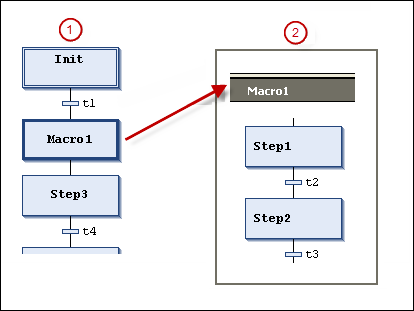
① Main view in the SFC editor
② Macro editor view for Macro1
In turn, macros can contain other macros. The header of the macro editor always shows the path of the currently opened macro within the chart.
Example
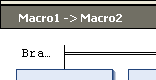
-
See also: ⮫ SFC → Zoom into Macro
-
See also: ⮫ SFC → Zoom out of Macro