

-
Select the
Step2step. -
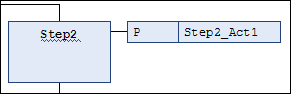
Click “SFC Insert Action Association”.
CODESYS inserts an association to the right of the
Step2step. -
Click in the left field of the association to select the ⮫ qualifier.
You can enter the qualifier manually or use the
 Input Assistant. Select
 P. -
Click in the right field of the association to select the action.
You can type the action or select it by using the
Input Assistant .
 Permalink