


-
Select the
Step0step. -
Click “SFC Add Exit Action”.
By default, you are prompted to select the duplication mode for the step actions of the step. See above for adding an entry action. Then the “Insert Exit Action” dialog opens.
-
Specify the name as
Step0_exitand select the “Structured Text (ST)” implementation language. Click “Add”.The
Step0_exitaction is inserted below the POU in the device tree and opened in the editor.In the
Step0_exitexit action, you program statements to be executed one time before theStep0step becomes inactive. -
Close the editor of
Step0_exit.The
Step0step is now marked with anXin the lower right corner. Double-click this marker to open the editor.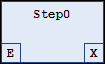
You can define the exit action in the properties of the step in “Exit action”. Other actions can also be selected there.