SKP_SlitterAutomaticKnifePositioning (FB)
FUNCTION_BLOCK SKP_SlitterAutomaticKnifePositioning
This application is used for the automatic positioning knife part of the slitting machine. By driving the mechanical device through a servo motor, the knives are arranged to achieve the goal of automatic positioning knife arrangement. Compared to traditional manual positioning knife, automatic positioning knife can greatly improve production efficiency.
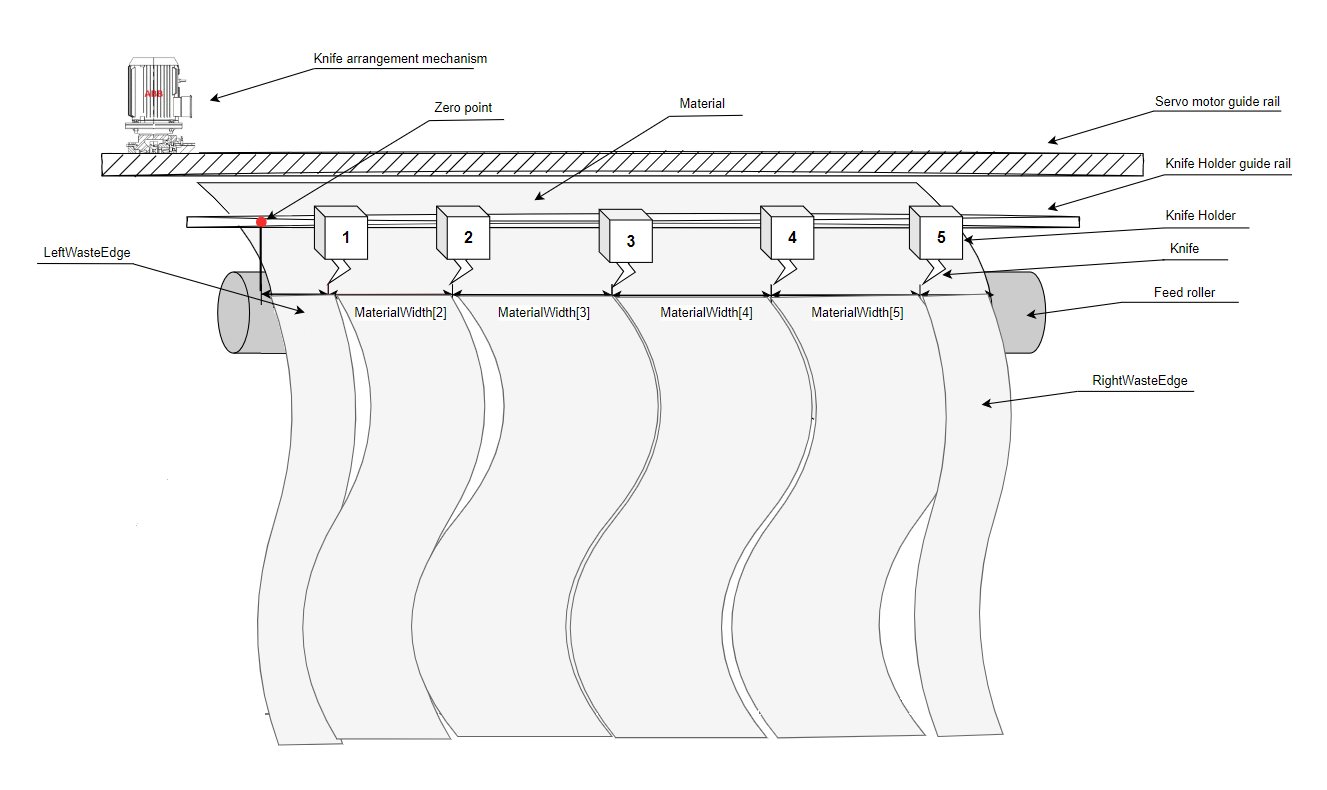
Knife arrangement mechanism
The Knife arrangement mechanism includes a latch, a cylinder, and a servo motor. The cylinder is used to drive the latch to lock and release the knife, while the servo motor is used to drive this kinfe arrangement mechanism to position the knife.
Zero Point
Mechanical zero point of servo motor, reference point for all dimensions.
LeftWasteEdge
Left waste width input by the user.
RightWasteEdge
Right waste width input by the user
MaterialWidth[n]
The width of each required cutting material entered by the user.
Servo motor guide rail
The rack guide rail for the operation of the cutting servo motor is connected to it through gears.
Knife
The cutting tool used for cutting materials is generally made of metal material.
Knife holder
The knife is installed on the knife base, and there are also two cylinders installed on the knife base, one for locking and releasing the knife, and the other for lifting and lowering the knife.
Knife holder guide rail
The guide rail used to fix the knife holder can be moved through the guide rail.
Feed roller
Power rollers for material conveying, used to pull materials.
Note
For the MaterialWidth array, it take effect from MaterialWidth[2].
If the LeftWasteEdge is zero, the function block will not select a knife to cut the last LeftWasteEdge.
If the RightWasteEdge is zero, the function block will not select a knife to cut the last MaterialWidth.
For left to right mode,after a successful positioning for each knife,function block will recalculate the target position for next one, if this position can’t be reached,function block will report error.
- InOut:
Scope
Name
Type
Initial
Comment
Input
ExecuteBOOLStarts the function block at rising edge
KnifeMoveVelLREALMechanical and knife move together at this velocity.unit:mm/s
KnifeSearchingVelLREALMechanical to search knife at this velocity.unit:mm/s*
BackParkPosVelLREALMechanical back to home position at this velocity.unit:mm/s
KnifeAccLREALAcceleration for positioning knife velocity.unit:mm/s°°2
KnifeDecLREALDeceleration for positioning knife velocity.unit:mm/s°°2*
EPCOffsetLREALThe overall offset of the material relative to the home position.unit:mm
KnifeSelectionModeINT2
1:Left to right mode, The function block will select the kinfe from left to right according to the material width.2: Best path mode,The function block will calculate the shortest path for the servo motor to move based on the material width to select the knife.
KnifeDownModeBOOLMode of knife go down,False=manual ,True=auto
KnifeNumberINTNumber of all knives.must >=3 and <= 99
KnifeSpaceMinLREALMinimum safty space between two knives.unit:mm
ParkPositionLREALWhen procress is done,mechanical back to this position.unit:mm
KnifeHolderWidthLREALEnd position of knife,it is used to determine whether all material lengths are legal.unit:mm
EPCLimitLREALHigh limitation for edge position controller
LeftLimitSwitchBOOLLeft limit hardware switch of Mechanical
RightLimitSwitchBOOLRight limit hardware switch of Mechanical
KnifeLimitHighARRAY [1..99] OF LREAL
Upper limit of each knife travel.unit:mm.
KnifeLimitLowARRAY [1..99] OF LREAL
Lower limit of each knife travel.unit:mm
LeftWasteEdgeLREALLeft waste edge width.unit:mm
RightWasteEdgeLREALRight waste edge width .unit:mm
MaterialWidthARRAY [1..99] OF LREAL
The cutting width of each section of material input by the user.unit:mm
KnifeInitialPositionARRAY [1..99] OF LREAL
The initial position of each knife at the start of the process
KnifeOffsetPositionARRAY [1..99] OF LREAL
Fine adjustment value for each blade position
KnifeEnabledARRAY [1..99] OF BOOL
Available status of each kinfe, true means this knife can be selected and vice versa
KnifeLockPositionARRAY [1..99] OF BOOL
The locking position of knife feedback from the sensor
KnifeUnLockPositionARRAY [1..99] OF BOOL
The unlocking position of each knife feedback from the sensor
KnifeUpPositionARRAY [1..99] OF BOOL
The up position of each knife feedback from the sensor
KnifeDownPositionARRAY [1..99] OF BOOL
The down position of each knife feedback from the sensor
KnifeCheckSensorBOOLThe sensor feedback detects the kinfe signal
LatchUpPositionBOOLThe up position of the latch feedback from the sensor
LatchDownPositionBOOLThe down position of the latch feedback from the sensor
CylinderActionDelayTimeDINT500
Cylinder action delay time.unit:ms
Output
DoneBOOLShows the status of the function block. Done = TRUE if the execution is finished
BusyBOOLShows the status of the function block. TRUE when the instruction is acknowledged.
ActiveBOOLTrue when the axis is being controlled.
CommandAbortedBOOLCommand is aborted by another command from other PLCopen function block
ErrorBOOLSignals that error has occurred within function block
ErrorIDAC500_MotionControl.ERROR_IDAC500_MotionControl.ERROR_ID.MC_Ok
Contains the error code when there is an error.
AppErrorIDError identification. For error details refer to Enumeration ERROR_ID
ExtendLatchBOOLLever cylinder extend to take the knife
RetractLatchBOOLLever cylinder retract
KnifeSelectionARRAY [1..99] OF BOOL
Selection status of each knife,True=selected,False=Not be selected
KnifeLockARRAY [1..99] OF BOOL
Output signal of locking cylinder
KnifeUnLockARRAY [1..99] OF BOOL
Output signal of unlocking cylinder
KnifeUpARRAY [1..99] OF BOOL
Output signal of knife up cylinder
KnifeDownARRAY [1..99] OF BOOL
Output signal of knife down cylinder
KnifeActualPositionARRAY [1..99] OF LREAL
Actual position of knife when positioning knife process is done
TotalTimeTIMETotal time for the whole process
KnifeCylinderActionErrorARRAY [1..99] OF BOOL
Knife cylinder action error
Inout
AxisAxis_RefReference to axis
Structure: