MC_StepRefPulse (FB)
FUNCTION_BLOCK MC_StepRefPulse
This function block performs homing by searching for Zero pulse (also called Marker or reference pulse) in encoder.

The reference pulse appears once per encoder revolution. The advantage in using Reference Pulse for homing is the higher accuracy and precision that can be achieved compared to traditional optical, mechanical or magnetic sensors.
- Example
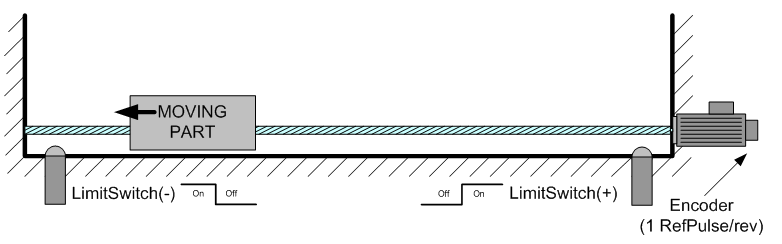
The axis state is changed to Homing if not already in.
Home is commanded by user in the desired homing direction at the programmed velocity.
First occurrence of the Reference Pulse, Homing is finished.
This function block modifies actual position and sets to the “SetPosition” input value at the end
This function block clears the Homing State when Done.
It is common that a first approach is performed against a mechanical sensor at higher velocity, and after a Reference Pulse, at a lower velocity. This is a traditional 2-Step homing (Coarse by external Switch in reverse and Fine by Reference Pulse in forward). For ease of use both functions could be grouped together in single function block. Advantage having the function blocks separate is that any combination is possible (MC_Block and after MC_RefPulse, etc.), stating different velocity and conditions for each Step (higly flexible), without increasing homing function block complexity too much.
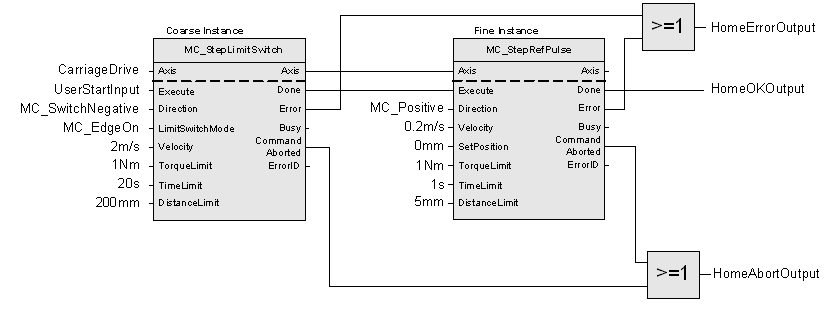
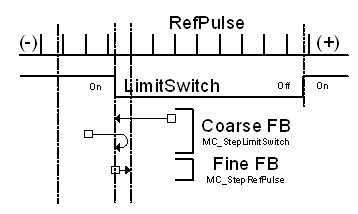
Note
This Function Block should be used when encoder feedback is connected directly to PLC ( Ex: CD522 / eCo Onboard IO)
- InOut:
Scope
Name
Type
Comment
Input
ExecuteBOOLStarts the function block at rising edge
Direction- Specifies the direction to start the motion, just MC_Positive and MC_Negative are possible to use:
MC_Positive = Starts in positive direction always
MC_Negative = Starts in negative direction always
VelocityLREAL[u/s] Value of the maximum velocity (not necessarily reached). Range: >0
AccelerationLREAL[u/s°°2] Value of the acceleration (increasing energy of the motor). Range: >0.If value = 0, Acceleration will be equal to parameter paraMaxAccelerationAppl.If value > 0 and <= 1,Acceleration will be limited to 1.
DecelerationLREAL[u/s°°2] Value of the deceleration (decreasing energy of the motor). Range: >0.If value = 0, Deceleration will be equal to parameter paraMaxDecelerationAppl.If value > 0 and <= 1,Deceleration will be limited to 1.
SetPositionLREAL- [u] Value of the absolute position to be set when homing is doneRange:
Linear Axis: Maximum range is 16#7FFFFFFF in increments, if configured in units, range will be limited to equivalent of 16#7FFFFFFF increments
Modulo Axis: Range will be limited by Modulo range defined
TorqueLimitLREALNot supported
TimeLimitLREAL[s] If the function block condition is not met in the TimeLimit, an error is issued. 0 = No time limit
DistanceLimitLREAL[u] If the funciton block condition is not met within a DistanceLimit travel, an error is issued. 0 = No distance limit
BufferModeNot supported, default mcABORTING used
Output
DoneBOOLShows the status of the function block. Done = TRUE if the execution is finished
BusyBOOLThe function block is not finished
ActiveBOOLIndicates that the function block has control on the axis
CommandAbortedBOOLCommand is aborted by another command from other PLCopen function block
ErrorBOOLSignals that error has occurred within function block
ErrorID- Error identification. For error details refer to Enumeration ERROR_ID
Specific Error numbers: + MC_TimeLimitExceeded + MC_DistanceLimitExceeded + MC_TorqueLimitExceeded
Inout
AxisReference to axis
Structure: