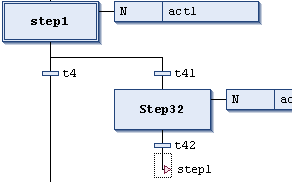
Symbol: 
A jump defines which step should be executed next as soon as the transition preceding
the jump is TRUE. Jumps may become necessary, as execution paths cannot cross or lead upwards.
Excluding the required jump at the end of a chart, you can generally insert jumps only at the end of a branch.
The destination of a jump is defined by the added text string, which you can edit directly. The jump destination can be a step name or the marker for a parallel branch.
For more information, see: ⮫ “Programming in SFC ”, ⮫ “Creating a POU in SFC ”, ⮫ “Adding a step-transition ”, ⮫ “Adding an entry action ”, ⮫ “Adding an exit action ”, ⮫ “Adding an action ”, ⮫ “Adding an alternative branch ”, ⮫ “Adding a jump ”, ⮫ “Adding a macro ”, ⮫ “Adding an association ”