SolarEncoderIO (FB)
FUNCTION_BLOCK SolarEncoderIO EXTENDS AbbLConC3
Function block to easily integrate with any S500 I/O card, Incremental encoders (A, B) plus inductive proximity sensor (Z) as positioning sensors for Solar Trackers.
The I/O modules on the I/O bus have two inputs of fast counters per module, which are activated via AB configuration. Each module counter can be configured up to 10 possible modes. After that, it is activated during the initialization phase (power-on, cold start, warm start).
To Configure: Configuration -> Devices -> IO Bus -> DC522 -> DC522 IO Mapping -> Fast counter -> Map variable for position sensors
Note
Please refer to Automation Builder help for CD522 module configuration and parameter details.
Example configuration of the module is described in the example project and example documentation.
- Example
Using DC522 IO module as fast counter
Use the Automation builder to configure the IO module for fast counter instances described below,
- Fast counter
“7-1 UpDown directional discriminator”: + The x1 counting mode is used. The encoder module discriminates the rotating way and count one pulse for each rising edge of the A signal. + In this mode the maximum counting frequency is 35 kHz. + The rotation is identified with a shift angle (90°) between A and B signal. In the I/O module, the clockwise rotation is identified with A signal in advance to B (see figure below).
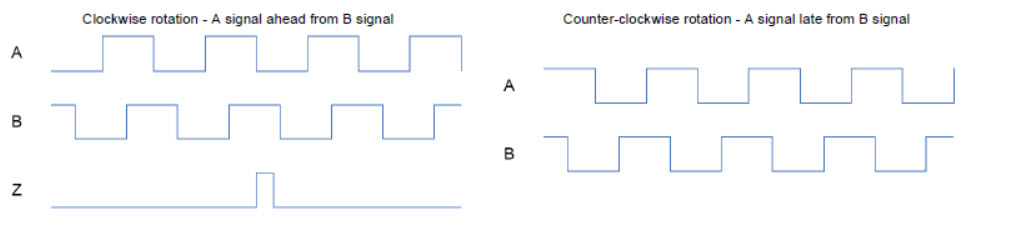
- Fast counter
“9-1 UpDown directional discriminator X2”: + The x2 counting mode is used. The module counts both the positive edges and the negative edges of trace A. + The result is the double number of counting pulses, so the precision increases correspondingly. + In this operating mode, the maximum counting frequency is 30 kHz.
- Fast counter
“10-1 UpDown directional discriminator X4”: + The x4 counting mode is used. The counter counts the positive and negative edges of the traces A and B. In this operating mode, the maximum counting frequency is 15 kHz. + The I/O modules provide two fast counter inputs to use for relative positioning with 2 signals (A, B).
Note
To acquire the Z signal, a conventional input channel should be used.
- InOut:
Scope
Name
Type
Initial
Comment
Inherited from
Input
EnableBOOLFALSE
A rising edge (Enable = TRUE) starts the operation, the output Busy goes to TRUE. All other inputs are read and considered continuously. Execution will continue forever until a falling edge (Enable = FALSE) aborts the operation. During Aborting the Busy is still TRUE. Afterward all outputs are reset.
AbbLConC3
Output
BusyBOOLFALSE
Operation is running (while output Error is FALSE)
AbbLConC3
ErrorBOOLFALSE
Operation is stopped with error (while output Busy is FALSE). This output is TRUE for at least one cycle or until Enable is set to FALSE. The output ErrorID gives more details about the error.
AbbLConC3
Input
EnableCounterBOOLFALSE
- 2: Enable the counter function of the module
If EnableCounter = TRUE, pulse counting of counter is enabled.
If EnableCounter = FALSE, no pulse counting is performed and pulses are not stored even the encoder device changes its position.
If counting has already started and if EnableCounter = FALSE, the pulse counting stops and counter value PosAct is stored. If EnableCounter = TRUE again, the pulse counting will start again and counter value PosAct will continue since previous value.
SetStartBOOLFALSE
4: If TRUE, counter takes values from input SetStartValue to transfer it to PosAct. After that, RdySet = TRUE. As long as input SetStart = TRUE, no pulses are counted because the counter is always overwritten by the input SetStart
SetStartValueREAL0
5: 32 bit start counter value
EnableCalibBOOLFALSE
- 6: Enabling calibrating process
If EnableCalib = TRUE, when a rising edge is detected at the encoder´s reference point(Z) signal, output ZValue will take the stored value in PosAct and output RdyCalib is set to TRUE. If this input is continuously TRUE, only one calibrating process will be done even system reaches encoder´s reference point(Z) once again. In order to enable another calibrating process, input EnableCalib has to be set to FALSE and set to TRUE again.
Calibrating process is executed out of CPU cycle, and it is able to detect the multiple rising edges that appear when a simple limit switch is used. Due to that, it is recommended to use devices assembled especially for this purpose (high accuracy limit switch). Inputs used as reference point Z in the calibrating process are: Counter0 -> I3, Counter1 -> I11
EnableSyncBOOLFALSE
- 7: Enabling synchronizing process
If input EnableSync = TRUE, when a rising edge is detected at the encoder´s reference point(Z) signal, output PosAct will take the value stored at ZValue, output RdySync is set to TRUE only during a program cycle. While EnableSync is set to TRUE, PosAct output will take the value stored at ZValue every time that a rising edge is detected at the encoder´s reference point(Z) signal.
Inputs used as reference point Z in the synchronisation process are: Counter0 -> Z0, Counter1 -> Z1.
MeasuringStepREAL0
- 8: Indicates the resolution of the encoder device (see technical data from manufacturer). Format: Degrees
For example, using an incremental encoder with resolution of 10000 pulses each 360° and x4 counting mode (software configuration), measuring step will use the following value: 360 / (4 x 10000) = 0,009.
ZPulseBOOLFALSE
9: Encoder’s reference position Z reached. This signal is only visible if programs execution time is slower than the signal of encoder’s reference point (Z).
Inout
CounterInARRAY [0..9] OF BYTE
10: Array of BYTE for input of Configuration fast counter
CounterOutARRAY [0..17] OF BYTE
11: Array of BYTE for output of Configuration fast counter
PosActREAL- 12: The current position (actual position) can be retrieved at any time using the output PosAct.
Note
If a shutdown occurs, value of actual position will be lost. Hence, parameter must be declared as a retain variable.
If communications problem occurs between CPU and IO module, position value stored in PosAct will be lost.
ZValueREAL13: Indicates the position of the encoders reference point (Z). The user is able to configure where the Z position is, Format: Degrees
Output
ErrorIDNO_ERROR
3: Error number
RdySetBOOLFALSE
4: When the action of SetStart finishes, RdySet is set to TRUE for only one cycle
RdyCalibBOOLFALSE
5: The output RdyCalib displays ready message of calibrating process. While input EnableCalib is set to TRUE, RdyCalib = TRUE. If EnableCalib = TRUE and rising edge is detected at ZPulse signal, RdyCalib will be TRUE until EnableCalib = FALSE.
RdySyncBOOLFALSE
6: Displays the ready message of the synchronisation process. It is set to TRUE only for one cycle
Methods:
D_AbortAction
A_StartAction
B_CyclicAction
C_CleaningAction
E_ResetAction
Structure: