MC_LoadControl (FB)
FUNCTION_BLOCK MC_LoadControl
This function block commands a controlled torque/force/pressure movement.

This function block continuously exerts a torque or force or pressure of the specified magnitude. This magnitude is approached using a defined ramp (‘LoadRamp’), and the function block sets the ‘InLoad’ output if the commanded load level is reached. Positive torque, force and differential pressure is in the positive direction of velocity, pressure is physically unsigned.
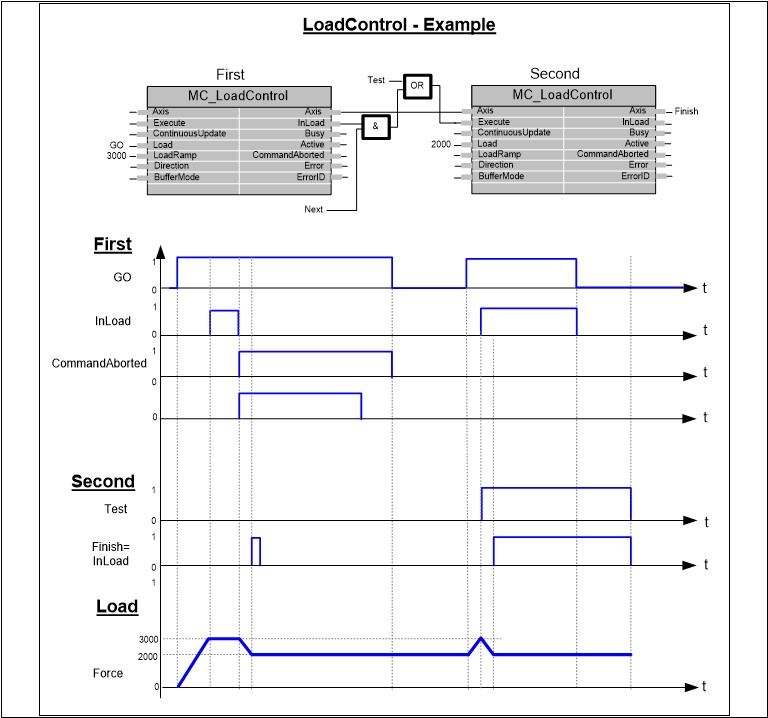
- Example
The function block LoadControl provides base functionality for any application in which the devolution of forces, torque or pressures provided by an axis to a process has to be actively defined and controlled (e.g. in presses).
Note
Using this command leads to undefined motion of the axis, unless other (motion controlled) axes or mechanical structures (arrester) are involved.
- InOut:
Scope
Name
Type
Initial
Comment
Input
ExecuteBOOLStarts the function block at rising edge
ContinuousUpdateBOOLDecide if new input parameters are processed during the movement. This input is checked only when Execute gets TRUE
LoadLREAL[u] = technical unit. Value of the load, Torque/ Force/ Pressure. Positive and negative values are allowed
LoadRampLREAL[u/s] = technical unit. Absolute value of the input is considered. If LoadRamp = 0, will result in a jump for load- change, as fast as possible
DirectionMC_DirectionDefault
- Input Load itself is a signed value. “Direction” applies to the movement for, required load to reach with a positive or negative reference or any direction required.
DEFAULT: The required load will be reached, no matter what direction movement is required
POSITIVE: The required load will be reached just when it is possible to do so with movement in positive direction
NEGATIVE: The required load will be reached just when it is possible to do so with movement in negative direction
BufferModeMC_BufferModeNot supported, default mcABORTING used
Output
InLoadBOOLCommanded load finally reached, the actual load can be different
BusyBOOLThe function block is not finished
ActiveBOOLIndicates that the function block has control on the axis
CommandAbortedBOOLCommand is aborted by another command from other PLCopen function block
ErrorBOOLSignals that error has occurred within function block
ErrorIDAC500_MotionControl.ERROR_IDError identification. For error details refer to enumeration ERROR_ID from AC500_MotionControl library
Inout
Load_AxisReference to axis