


AC500 as IED can act as IEC 61850 MMS server (Example A) and / or GOOSE Publisher and Subscriber (Example B). Most of the engineering steps are common and are explained in this chapter. The examples projects A and B can be found in the Automation Builder example folder.
Example projects for the libraries can be found in the example folder: “Help Project examples” in the Automation Builder menu.
Prerequisite: Install the related library package with Automation Builder Installation Manager - [Modify].
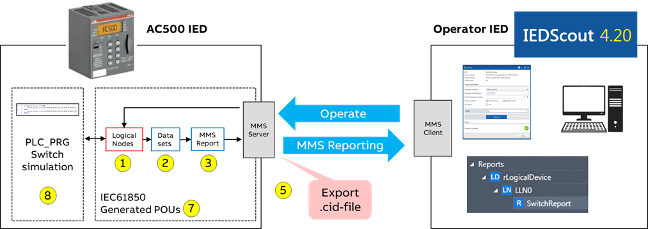
Example A
Communicating through MMS server:
A simulated switch in AC500 which can be operated from an operator IED and sends back its status through an MMS report.
Example B
Communication though GOOSE:
AC500 publishes a GOOSE control block (e.g. “ping”) to another IED (for example REF615 or a second AC500), which itself sends back a GOOSE control block (e.g. “pong”), that is subscribed by AC500 IED.
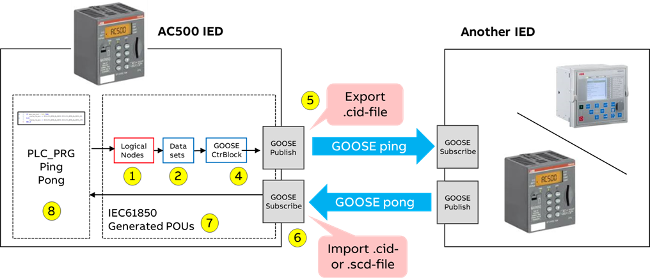
For engineering of the above functionalities, the Automation Builder is acting as IED configurator tool according to IEC 61850-6. The following engineering steps (yellow circles in the figures above) need to be executed:
-
Configure the “IEC 61850 Server” with logical nodes, which are connected to global variables in the IEC 61131 application.
-
Group data objects and attributes of the logical nodes into data sets.
-
Publish data sets as MMS report.
-
Publish data sets as GOOSE Publisher.
-
Export server as *.cid file. So that other IEDs can access logical nodes and data sets and subscribe to MMS reports or GOOSE control blocks.
-
Configure GOOSE Subscriber to subscribe GOOSE control blocks from other IEDs after importing *.cid or *.scd files. The control blocks are connected to the “PLC_PRG (PRG)” application.
-
Generate code for IEC 61850 POUs.
-
Generate the application “PLC_PRG (PRG)” including logical node functionality.