


In this tab of the IEC 61850 editor it is possible to create and parameterize buffered und unbuffered reports. A report transports the data, that are assigned to it, to the connected client in the event of a trigger. Each report a data set must be assigned to.
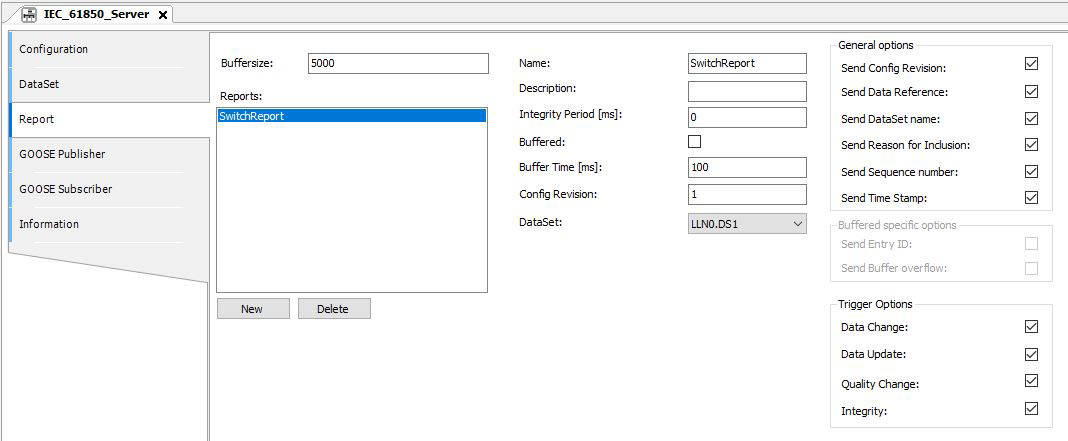
In the left part the created report control blocks (RCB) are listed. The following buttons are available:
-
[New]: Create a new report control block.
-
[Delete]: Delete the selected report control block.
In the middle part you make general settings for the reporting configuration.
|
Setting |
Description |
|---|---|
|
Buffersize |
Buffer size of buffered reports (in bytes). |
|
Name |
Unique report block name within the logical node. |
|
Description |
Description of the report block. |
|
Integrity Period [ms] |
Stealthy general interrogation. After this time the referenced data set will be actuated. Time (ms) between two messages. The messages are transferred cyclic, independent from other events. |
|
Buffered |
Enable / disable the report buffering. A buffered report stores the data, even if there's no connection to the client. In the case of an unbuffered report, the messages will get lost, if there is no connection to the client. |
|
Buffer Time [ms] |
Buffer time is the amount of time that the server waits to transfer a report after a given event occurs. Events that occur during this time period are collected and then transferred as a batch. If the buffer time is 0, the telegram will be sent immediately. For example, if the buffer time 10s the telegram will be sent after this time period or when the value changes the second time. |
|
Config Revision |
Versioning is used to identify whether or not a member was deleted from a data set or whether member order has changed. Such changes cause values to not be transferred, or cause values to be in a different location within the report. Such an event is communicated to the client with a new version number. Since all data sets are firmly defined, this identifier does not apply to the solution described here. |
|
DataSet |
Data set reference. |
The right part is for the setting of the following options:
-
“General options”: Control of the reporting behavior. An activated checkbox means, that the information is transferred by the message.
-
“Buffered specific options”: can be activated, if the option “Buffered:” is activated.
-
“Trigger options”: Determining of attributes to select the events which may trigger a message.
If the checkbox is activated the information will be transferred by the message.
|
Setting |
Description |
|---|---|
|
Send Config Revision |
“Config Revision” information. |
|
Send Data Reference |
Enable/disable to transfer the complete reference information, for example: LogicalDevice/GGIO1.ST.Mod.ctlNum |
|
Send DataSet name |
Enable/disable to transfer the data set name. |
|
Send Reason for Inclusion |
Enable/disable to transfer the reason of transmission for each attribute. |
|
Send Sequence Number |
Enable/disable to transfer a unique sequence number for each message. |
|
Send Time Stamp |
Enable/disable to transfer the timestamp of transmission for each message. |
|
Setting |
Description |
|---|---|
|
Send Entry ID |
Enable/disable to transfer the entry ID. |
|
Send Buffer overflow |
Enable/disable to transfer the message if a buffer overflow occurs. |
|
Setting |
Description |
|---|---|
|
Data Change |
Enable/disable to trigger the report if a “Data Change” event occurred. |
|
Data Update |
Enable/disable to trigger the report if a “Data Update” event of an attribute occurred. |
|
Quality Chance |
Enable/disable to trigger the report if a “Quality Change” event of an attribute occurred. |
|
Integrity |
Enable/disable the cyclic transmission of the report independent of any data changes (Stealthy general interrogation). The time period has to be defined in the “Integrity Period” general setting. |
|
General Interrogation |
Create a report control block and assign it to a data set
-
Activate the [New] button.
-
Select the desired data set from the “DataSet” selection list.