


-
Select the
Step2step. -
Click “SFC Insert Jump After”.
The
Stepjump is inserted after theStep2step. -
Select the
Stepjump destination.You can type the jump destination manually or select it by using the
 Input Assistant. Select
 Step0.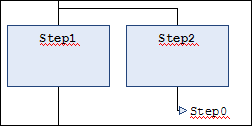
For more information, see: ⮫ “SFC Element: Jump ”