


For CM598-CAN module the execution of a PLC application task can be triggered automatically by a certain event, i.e. by incoming CAN 2.0 A or CAN 2.0 B frames. For this, the PLC application task is to be configured as external event task.
Prerequisites
Prerequisites
-
PLC firmware version 3.2.5 and Automation Builder as of version 2.2.5.
-
Only one PLC application task can be assigned to a communication module.
-
Triggering of event tasks is only supported for the communication module CM598-CAN.
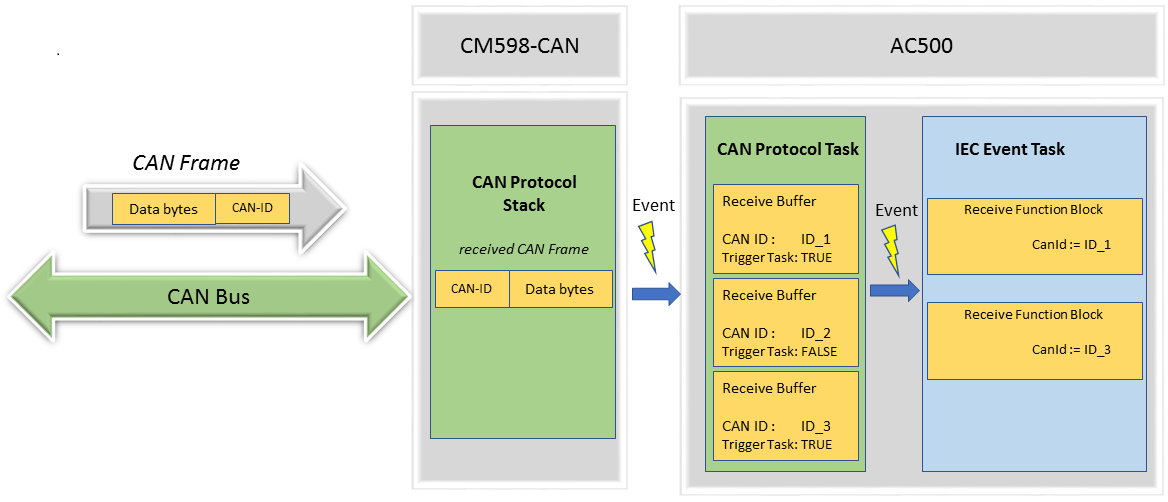
Every incoming CAN frame on a CM598-CAN module processes an event in the AC500 PLC. If the parameter "Trigger PLC Task" is set to TRUE, the CAN protocol task checks via the receive buffer configuration and the corresponding CAN-ID of the CAN frame whether a CAN frame is to be executed or not. Only those CAN-IDs that are configured in the protocol configuration will be processed. All other CAN frames will be rejected. If a CAN frame is to be processed, the CAN frame data is copied to the receive buffer and an event on the IEC event task is triggered.
The IEC event task will be executed for one cycle.
The IEC event task will be triggered continuously until all associated receive buffers have been emptied. Hence, ensure that the buffers are emptied by the task, otherwise the task will run into a loop.
Within the task the function block Cm598CanMsgRecEvt must be used to read the CAN frames from the receive buffers. The function block Cm598CanMsgRec is not suitable as it requires several task cycles for execution.
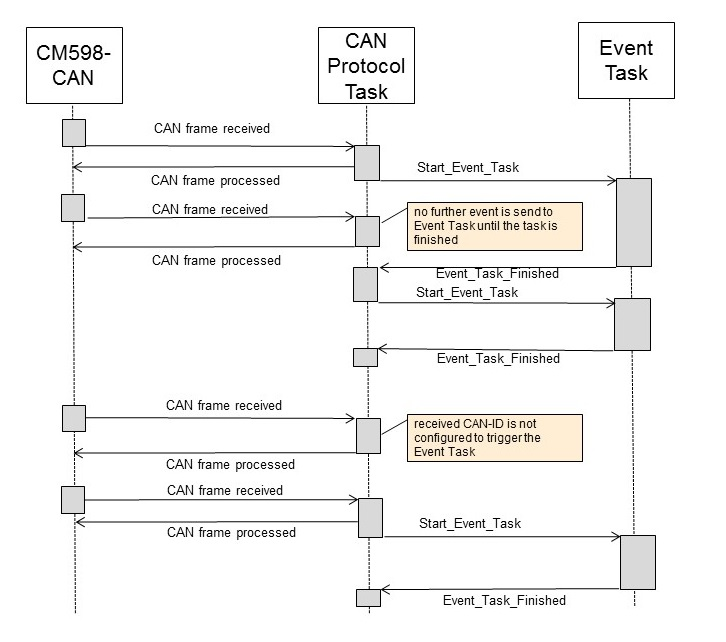
CAN frame processing
-
Only one external event task can be assigned to a CM598-CAN.
-
There is only one common event for an external event task and all selected CAN-IDs. It must be evaluated which CAN-IDs have been received.
-
It is possible that CAN frames are lost when necessary system resources are in use or when the CAN frames could not be processed in time due to high system load. So, the PLC application must monitor the task which consumes the events of the CAN protocol with a watchdog mechanism or something similar.
-
Received CAN frames of the same CAN-ID are internally stored in FIFO buffers. Reading and writing of the FIFO buffers is not possible at the same time.
-
Within an external event task the function block Cm598CanMsgRecEvt must be used to read the received CAN frames. The function block Cm598CanMsgRec is not suitable since its execution needs more than one task cycle.
-
The CAN-IDs that are enabled to trigger an external event task must be read by the associated task. Otherwise the task is triggered again and again, and the CPU load will be high.
Event task configuration
Add the external event task that should be executed to the task configuration of the PLC application:
-
Right-click on “Task Configuration”. Enter a name for the task and click “Add object”.
-
Right-click on the new task and append a “Program Call”. This contains the program code that is executed by the task.
-
Double-click on the task and setup the task parameters.
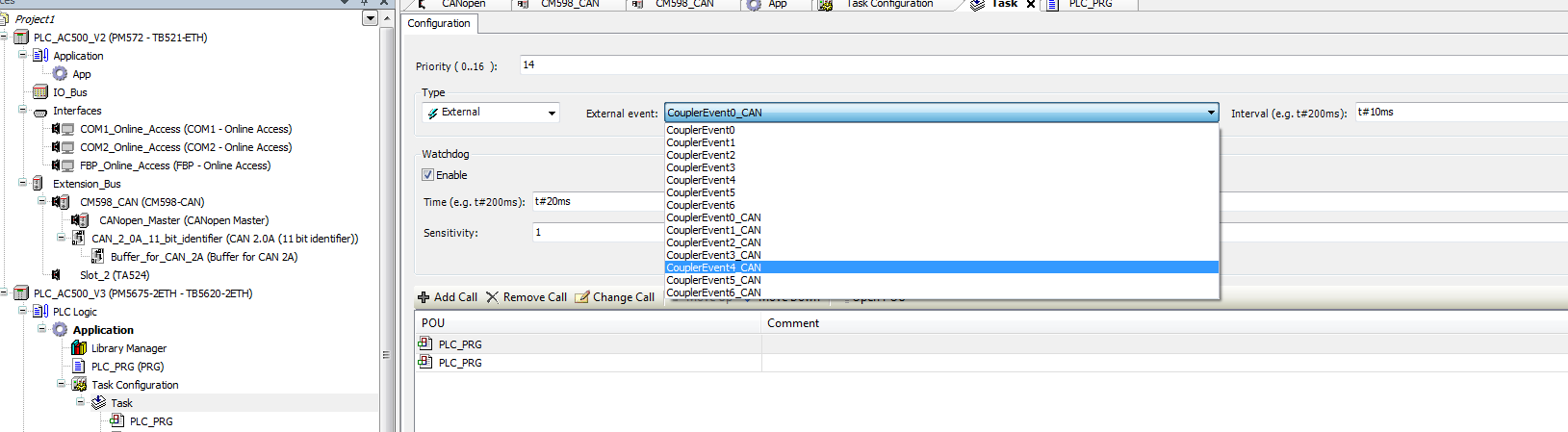
A parameter description is given in the chapter 'Tab 'configuration''. Deviations are described in the following:
|
Parameter |
Default |
Value |
Description |
|---|---|---|---|
|
Priority |
16 |
0..16 Value '0' indicates the highest priority |
Priority of the task |
|
Type |
n.a. |
External |
Specifies the task type. |
|
External Event |
n.a. |
CouplerEvent<slot index of the CM>_CAN |
Specifies the event that triggers execution of the task. |
|
Interval |
n.a. |
Cycle time |
Not used |
Configuration of a CM598-CAN module is desribed in the configuration chapter ⮫ “CANopen”.