


|
This is the web edition of the original ⮫ AC500-S safety user manual, version 1.3.2. This web edition is provided for quick reference only. The original safety user manual must be used to meet functional safety application requirements. |
|
Standards |
Requirements |
|---|---|
|
IEC 60204-1:2016 |
9.2.3.4 Emergency operations (emergency stop, emergency switching off) … The reset of the command shall not restart the machinery but only permit restarting. |
|
ISO 13849-1:2015 |
5.2.2 Manual reset function |
|
ISO 12100: 2010 |
6.2.11.4: Restart following power failure/spontaneous restart |
|
ISO 13850:2015 |
Emergency Stop |
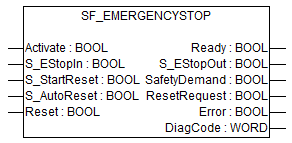
This function block is a safety-related function block for monitoring an emergency stop button. This FB can be used for emergency switch off functionality (stop category 0), or - with additional peripheral support - as emergency stop (stop category 1 or 2).
|
Name |
Data type |
Initial value |
Description, parameter values |
|---|---|---|---|
|
VAR_INPUT |
|||
|
Activate |
BOOL |
FALSE |
|
|
S_EStopIn |
BOOL |
FALSE |
Safety demand input. Variable. FALSE: Demand for safety-related response (e.g., emergency stop button is engaged). TRUE: No demand for safety-related response (e.g., emergency stop button not engaged). |
|
S_StartReset |
BOOL |
FALSE |
|
|
S_AutoReset |
BOOL |
FALSE |
|
|
Reset |
BOOL |
FALSE |
|
|
VAR_OUTPUT |
|||
|
Ready |
BOOL |
FALSE |
|
|
S_EStopOut |
BOOL |
FALSE |
Output for the safety-related response. FALSE: Safety output disabled. Demand for safety-related response (e.g., emergency stop button engaged, reset required or internal errors active) TRUE: Safety output enabled. No demand for safety-related response (e.g., emergency stop button not engaged, no internal errors active). |
|
SafetyDemand |
BOOL |
FALSE |
Optional. |
|
ResetRequest |
BOOL |
FALSE |
Optional. |
|
Error |
BOOL |
FALSE |
|
|
DiagCode |
WORD |
16#0000 |
|
Typical timing diagrams
Fig. 483: Timing diagram for SF_EmergencyStop: S_StartReset = FALSE, S_AutoReset = FALSE
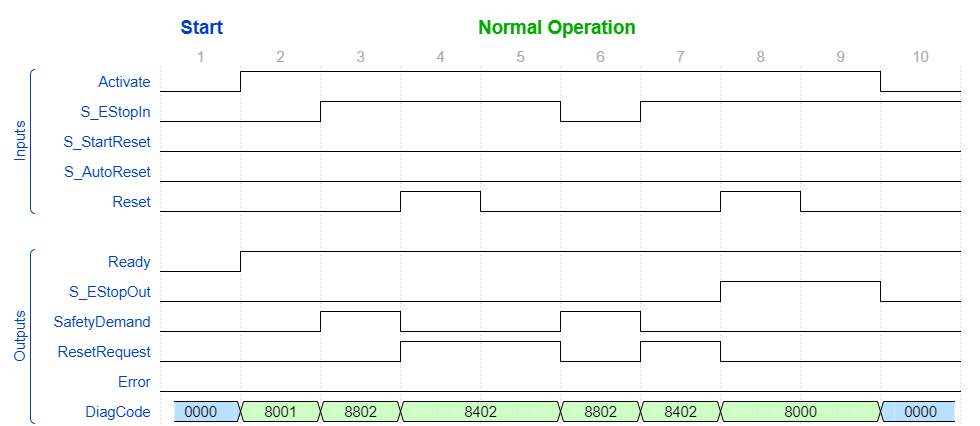
Fig. 484: Timing diagram for SF_EmergencyStop: S_StartReset = TRUE, S_AutoReset = FALSE
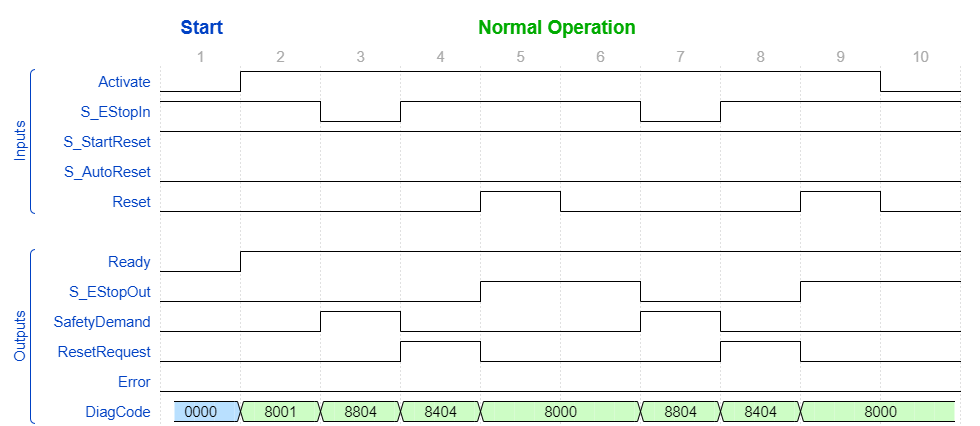
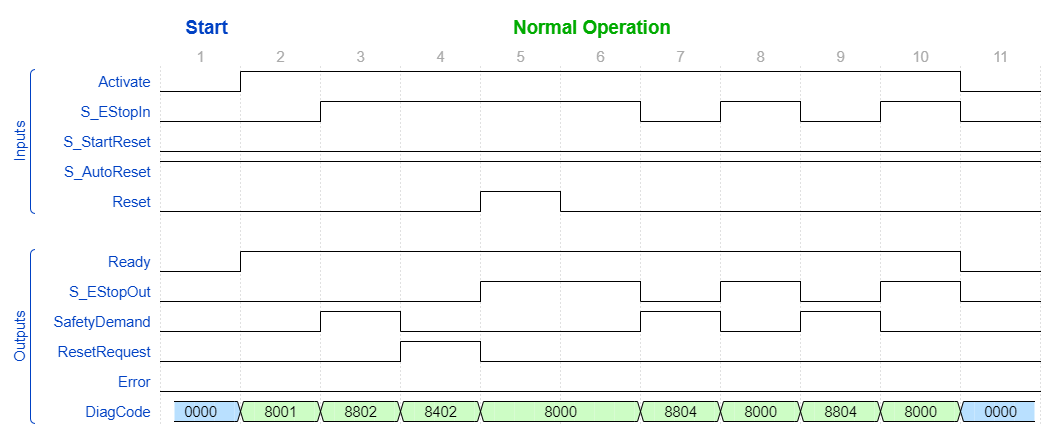
Fig. 485: Timing diagram for SF_EmergencyStop: S_StartReset = FALSE, S_AutoReset = TRUE
Error detection
The function block detects a static TRUE signal at Reset input.
Error behavior
S_EStopOut is set to FALSE. In case of a static TRUE signal at the Reset input, the DiagCode output indicates the relevant error code and the Error output is set to TRUE.
To leave the error states, the Reset must be set to FALSE.
Function block-specific error and status codes
|
DiagCode |
State name |
State description and output setting |
|---|---|---|
|
C001 |
Reset Error 1 |
Reset is TRUE while waiting for S_EStopIn = TRUE. Ready = TRUE S_EStopOut = FALSE SafetyDemand = FALSE ResetRequest = FALSE Error = TRUE |
|
C011 |
Reset Error 2 |
Reset is TRUE while waiting for S_EStopIn = TRUE. Ready = TRUE S_EStopOut = FALSE SafetyDemand = FALSE ResetRequest = FALSE Error = TRUE |
|
DiagCode |
State name |
State description and output setting |
|---|---|---|
|
0000 |
Idle |
The function block is not active (initial state). Ready = FALSE S_EStopOut = FALSE SafetyDemand = FALSE ResetRequest = FALSE Error = FALSE |
|
8001 |
Init |
Activation is TRUE. The function block was enabled. Check if S_StartReset is required. Ready = TRUE S_EStopOut = FALSE SafetyDemand = FALSE ResetRequest = FALSE Error = FALSE |
|
8802 |
Wait for S_EstopIn 1 |
Activation is TRUE. Check if Reset is FALSE and wait for S_EStopIn = TRUE. Ready = TRUE S_EStopOut = FALSE SafetyDemand = TRUE ResetRequest = FALSE Error = FALSE |
|
8402 |
Wait for Reset 1 |
Activation is TRUE. S_EStopIn = TRUE. Wait for rising trigger of Reset. Ready = TRUE S_EStopOut = FALSE SafetyDemand = FALSE ResetRequest = TRUE Error = FALSE |
|
8804 |
Wait for S_EstopIn 2 |
Activation is TRUE. Safety demand detected. Check if Reset is FALSE and wait for S_EStopIn = TRUE. Ready = TRUE S_EStopOut = FALSE SafetyDemand = TRUE ResetRequest = FALSE Error = FALSE |
|
8404 |
Wait for Reset 2 |
Activation is TRUE. S_EStopIn = TRUE. Check for S_AutoReset or wait for rising trigger of Reset. Ready = TRUE S_EStopOut = FALSE SafetyDemand = FALSE ResetRequest = TRUE Error = FALSE |
|
8000 |
Safety Output Enabled |
Activation is TRUE. S_EStopIn = TRUE. Functional mode with S_EStopOut = TRUE. Ready = TRUE S_EStopOut = TRUE SafetyDemand = FALSE ResetRequest = FALSE Error = FALSE |