


-
To change the IP address of devices, perform a network scan.
-
Select a device from the list and select the appropriate protocol under “Scan protocol”.
“DHCP” or “BOOTP” option: If required, DHCP or BOOTP can be used to receive the IP address for the device from the server.
“IP address”, “subnet mask”, “Std. gateway”: Use these fields to change the IP address settings, including the settings for the subnet mask and the standard gateway. Ensure that the combination of connection settings is correct.
Note for CI52x-Modbus devices
Note for CI52x-Modbus devices
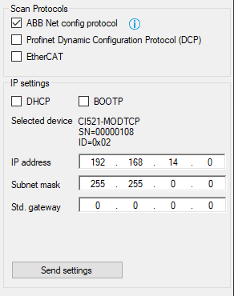
Consider the behavior of CI52x-Modbus devices if the last number of the IP address is set to "0".
-
Set the PLC to “Stop” mode (otherwise the change is not accepted).
Note for configurations with several configurable Ethernet ports (ETHx) e.g. PM5630-2ETH and CM5640-2ETH
Note for configurations with several configurable Ethernet ports (ETHx) e.g. PM5630-2ETH and CM5640-2ETH
All interfaces (ETHx) of the PLC onboard and CM5640-2ETH modules must be configured in different subnets. Overlapping of subnets must be avoided.
-
Change the IP configuration settings and click [Send settings] to transmit the data to the device.
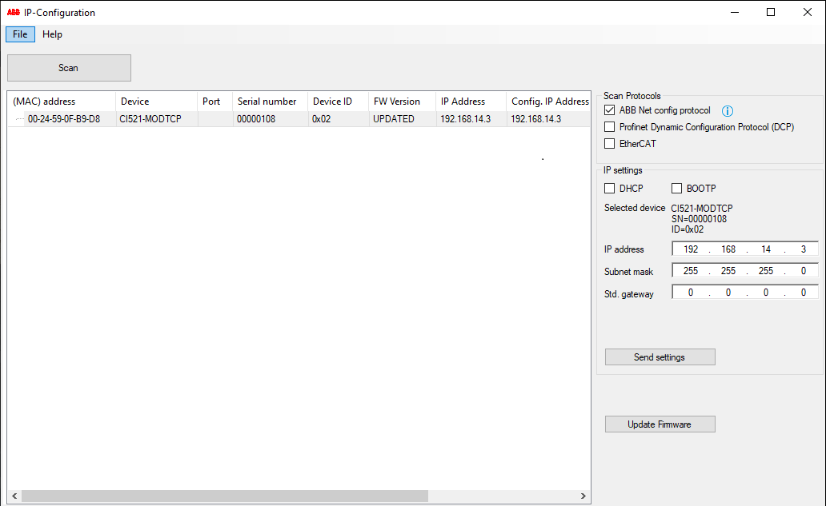
Note for PROFINET devices
Note for PROFINET devices
The device name of PROFINET devices can be edited. When changing the name, ensure that the following rules apply:
-
Labels must be separated by "."
-
Total length: 1 to 240
-
Label length: 1 to 63
-
Labels can contain characters [a-z] and numbers [0-9]
-
Labels are not allowed to start with "-"
-
Labels are not allowed to end with "-"
-
-
To retain all IP changes after a power cycle, the settings can be stored permanently. Confirm the prompted message during the scan process.
Check last number of IP address
This hint is only valid for CI52x-Modbus devices.
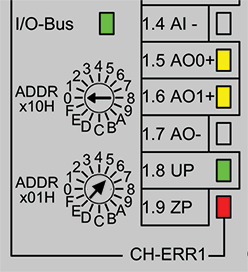
Check the last number of the IP address. If it is set to "0", the last number of the IP address is taken from the rotary switches on the hardware device.
Example:
|
Automation Builder |
AC500 communication interface module (rotary switch) |
|---|---|
|
IP address: 192.168.14.0 |
IP address: 6 |
 |
 |
|
As a result, in the “IP Address” field, the last number is set to "6".  |
|