


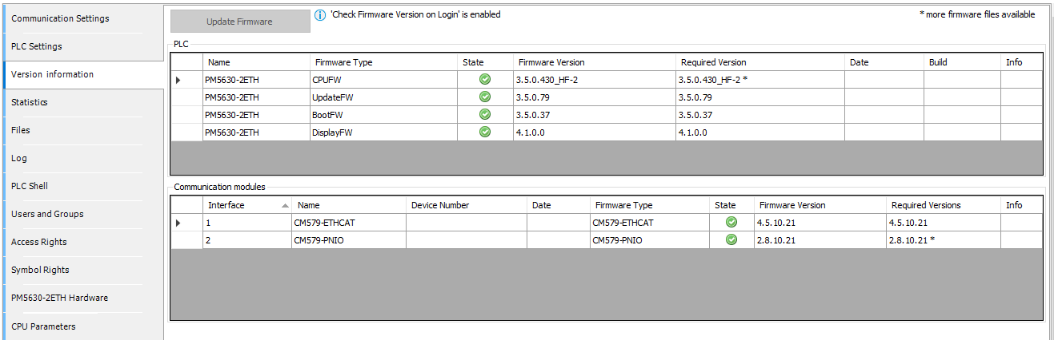
Information about the firmware versions of processor modules and communication modules is provided in the “Version information” tab.
Remarks:
-
The “Version information” tab displays the firmware version identified on the device and the version provided with Automation Builder.
-
The firmware on the devices must match the versions supported by Automation Builder. It may be necessary to upgrade or downgrade the current firmware in order to operate the PLC with the current Automation Builder version.
-
The “Required Version” field may contain more than one selectable version (drop-down list). This is indicated by an asterisk after the file name.
State icons
 |
Firmware version on the device matches the version supplied with Automation Builder. |
 |
Firmware version or type on the device differs from the version supplied with Automation Builder. Upgrade or downgrade to the version supplied with Automation Builder is recommended. |
 |
Only for communication modules if the CPU firmware must be updated first. This occurs when CPU firmware version is lower than 2.5.0.0. Firmware version or type on the device differs from the version supplied with Automation Builder. Upgrade or downgrade to the version supplied with Automation Builder is recommended. |
 |
The identified device differs from the configured device, therefore, no firmware update is possible. This occurs only for communication modules. |
|
No icon |
Firmware on the device is not updateable or no newer firmware than the initial version is available. |
The [Update Firmware] function for downloading new firmware is enabled only if updateable firmware is available.