


|
This is the web edition of the original ⮫ AC500-S safety user manual, version 1.3.2. This web edition is provided for quick reference only. The original safety user manual must be used to meet functional safety application requirements. |
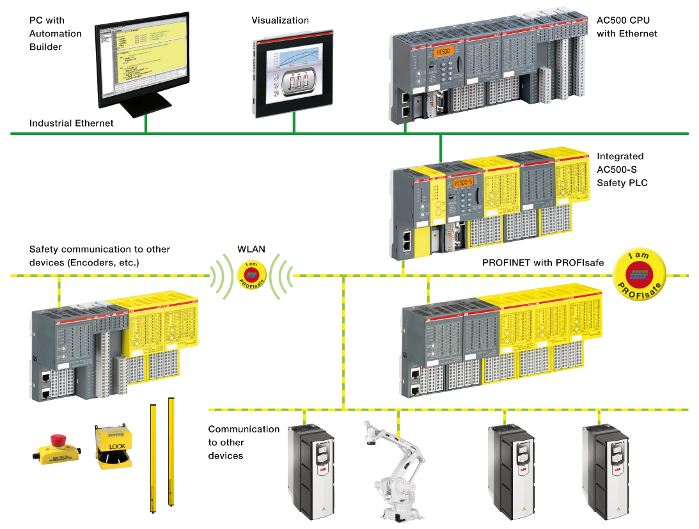
Safety data are transferred between safety CPU and safety I/Os using PROFIsafe profile⮫ [2]. SM560-S / SM560-S-FD-1 / SM560-S-FD-4 safety CPU needs a non-safety CPU to communicate to safety I/O modules. All safety-related communication takes place through the non-safety CPU using a "black channel" principle of data transmission⮫ [2].
The communication of safety CPU to remote safety I/O modules is done using PROFINET IO field bus with a PROFIsafe profile for safe data transmission⮫ [2]. Safety and non-safety I/O modules can be mixed on a local I/O bus both in central and remote configuration. PROFINET IO controller communication module (CM579-PNIO) shall be used on non-safety CPUs as a part of the "black channel" to transfer safety data to PROFINET IO devices. PROFINET devices CI501-PNIO, CI502-PNIO, CI504-PNIO and CI506-PNIO can be used to attach safety I/O modules in remote configurations.
Fig. 387: AC500-S system setup with PROFINET/PROFIsafe for remote safety I/Os, sensors and actuators
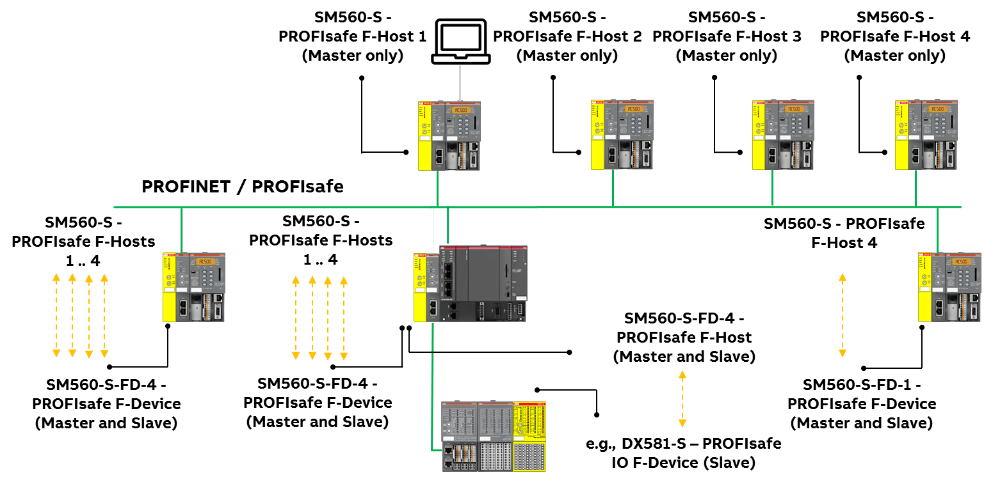
PROFINET/PROFIsafe communication between AC500-S safety CPUs is supported using CM589-PNIO and/or CM589-PNIO-4 PROFINET IO device communication modules together with SM560-S-FD-1 and/or SM560-S-FD-4 safety CPUs with F-Device functionality on one side and CM579-PNIO with any AC500-S safety CPU with F-Host functionality on the other side (Fig.388). SM560-S-FD-1 and SM560-S-FD-4 safety CPUs are able to exchange a large amount of safety data with F-Hosts (3rd party PROFIsafe F-Hosts are supported as well) using PROFINET/PROFIsafe by configuring up to 32 F-Submodules.
If using PROFIsafe short frame F-Submodules (supported for PROFIsafe V2.4 and V2.6), a maximum of 384 bytes can be exchanged (max. 32 F-Device instances with 12 bytes safety data for each input/output direction).
If using PROFIsafe long frame F-Submodules (supported for PROFIsafe V2.6 only), a maximum of 1353 bytes can be exchanged (max. 11 F-Device instances with 123 bytes safety data for each input/output direction).
SM560-S-FD-1 with F-Device(s) supports safe communication to maximum one F-Host. SM560-S-FD-4 with F-Device(s) supports safe communication to maximum four F- Hosts. Fig. 388 shows that using SM560-S-FD-1 and SM560-S-FD-4 safety CPUs with additional F-Device functionality one can establish safe CPU to CPU communication between different control stations on PROFINET/PROFIsafe. SM560-S-FD-4 safety CPUs can simultaneously communicate not only with 1 PROFINET IO controller/F-Host (Master) but with up to 4 PROFINET IO controllers/F-Hosts (Masters). In addition to SM560-S-FD-1 and SM560-S-FD-4 safety CPUs, CM589-PNIO and CM589-PNIO-4 PROFINET IO device communication modules are needed to establish PROFINET connectivity as "black channel", respectively, to 1 or up to 4 PROFINET IO controllers.
Fig. 388: Exemplary setup for safe CPU to CPU communication between various safety CPUs (SM560-S / SM560-S- FD-1 / SM560-S-FD-4)
The following communication requirements shall be fulfilled for using AC500-S safety PLC:
-
Safety data cannot be transferred over public networks, e.g., internet. If safety data is transferred across company/factory networks, ensure that sufficient protection is provided against manipulation (firewall or router for network separation).
-
Equipment connected to communication devices shall feature safe electrical isolation.

NOTICE
You can use AC500-S safety I/O modules and SM560-S-FD-1 / SM560-S-FD-4 safety CPUs with 3rd party F-Hosts on PROFINET. Download and install valid ABB GSDML files in your 3rd party F-Host engineering environment from ⮫ www.abb.com/plc.
After this, you can configure and use these AC500-S modules with 3rd party F-Host. Contact ABB technical support on how to obtain F_iPar_CRC values of AC500-S safety I/O modules for 3rd party F-Hosts.
Validate that all iParameters (input delay, channel configuration, etc.) for all AC500-S safety I/Os and other F-Devices are correct with a given F_iPar_CRC value using appropriate functional validation tests or verification procedure for those parameters⮫ “Verification procedure for safe iParameter setting in AC500-S safety I/Os”.
Default F_iPar_CRC values used in GSDML files for AC500-S safety I/O modules do not correspond to default iParameter configurations for AC500-S safety I/O modules and have to be re-calculated in the engineering tools before their usage. It was done to avoid unintended use of AC500-S safety I/O with 3rd party F-Hosts.