


Symbol: 
The command is implemented as a list box from which you can set an application active. By default, the list box is located on the toolbar.
Function: The list box displays the currently active application with its device path.
Call: The list box contains all applications that are organized in the “Devices” view. By clicking an entry in the list box, you activate the selected application.
Requirement: The project has multiple applications.
Example
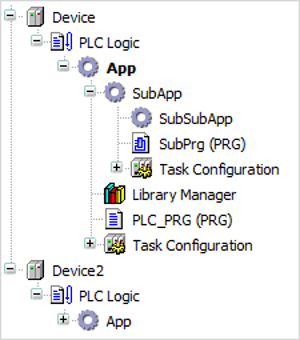
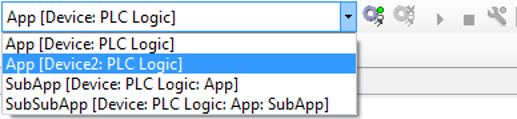
When you call commands in the “Build” oder “Online” menus, these commands are applied to the active application. This is displayed in the list box, and also displayed in bold in the device tree. In particular, this applies to the “Build Build” and “Online Login” commands.
You can also access these commands using the command icons on the toolbar where the list box is located. When the command icons are called, they are also applied to the active application.
However, if you call a command from the context menu of a device object in the device
tree, then the command is applied to the corresponding object. For example, by calling
 , you can establish a connection to an application on the device which is not active.