


-
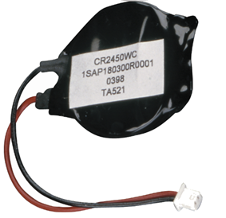
Adapter cable with encapsulated primary button cell
-
Contains a manganese dioxide lithium primary button cell, 3 V, 560 mAh
-
Non-rechargeable
Purpose
The TA521 accessory is used to provide a zero-voltage-safe power supply for the remanent memory and the real-time clock of the AC500 V2 CPU modules and the AC500 V3 CPU modules PM5630, PM5650, PM5670, PM5675, PM5680, PM5685.
TA521 is the only accessory that may be used for this purpose.
The accessory TA521 is not included with the AC500 CPUs. This accessory must be ordered separately.

CAUTION
This adapter cable with button cell is the only one which can be used with AC500 CPUs.
-
Replace TA521 only with activated supply voltage.
-
In order to prevent data loss or problems, the TA521 should be replaced after 3 years of utilisation or at least as soon as possible after receiving the "low primary lithium battery warning" indication.
-
Do not use the TA521 older than 3 years for replacement, do not keep device too long in stock.
-
TA521 must not be re-charged, not be disassembled and not be disposed of in fire. Attempting to charge primary lithium button cell will lead to overheating and can cause explosions.
-
TA521 must be stored in a dry place.
-
Exhausted TA521 must be recycled to respect the environment.
-
Never short-circuit or operate primary lithium button cell with the polarities reversed. The primary lithium button cell are likely to overheat and explode. Avoid unintentional short circuiting do not store primary lithium button cell in metal containers and do not place them on metallic surfaces. Escaping lithium is a health hazard.
Handling instructions
-
Do not short-circuit or re-charge the primary lithium button cell! It can cause excessive heating and explosion.
-
Do not disassemble the primary lithium button cell!
-
Do not heat up the primary lithium button cell and not put into fire! Risk of explosion.
-
Store the primary lithium button cell in a dry place.
-
Replace the primary lithium button cell with supply voltage ON in order not to risk data being lost.
-
Recycle exhausted primary lithium button cells meeting the environmental standards.

Primary lithium button cell lifetime
The primary lithium button cell lifetime is the time the primary lithium button cell can store data while the processor module is not powered. As long as the processor module is powered, the primary lithium button cell will only be discharged by its own leakage current.
Insertion
To ensure proper operation and to prevent data loss, the insertion or replacement of the TA521 must be always done with the system under power. Data buffering is not possible without the TA521 and power supply at the same time.
WARNING
Risk of fire or explosion!
Use of incorrect equipment may cause fire or explosion.
-
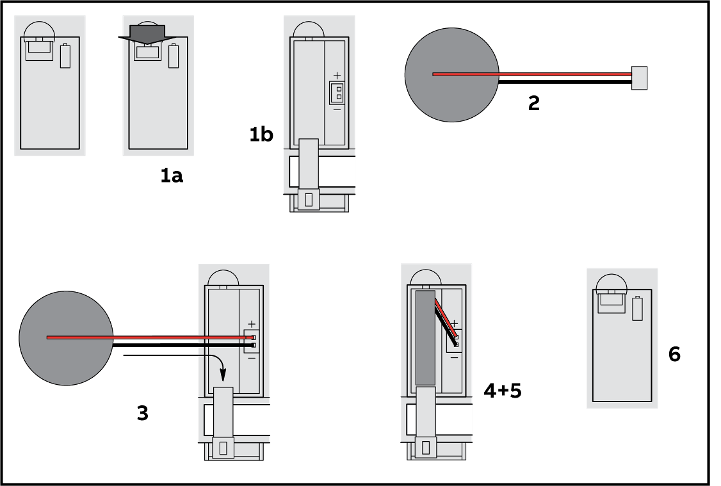
Open the compartment with the small locking mechanism, press it down and slip down the door. The door is attached to the front panel of the processor module and cannot be removed.
-
Remove the TA521 adapter cable with button cell from its package and hold it by the small cable. If the old TA521 needs to be replaced, remove then the small connector from the socket, do this best by lifting it out with a screwdriver.
-
Insert the TA521 connector of the adapter into the small connector port of the compartment. The connector is keyed to find the correct polarity (red = positive pole = above).
-
Insert first the cable and then the button cell into the compartment, push it until it reaches the bottom of the compartment.
-
Arrange the cable in order not to inhibit the door to close.
-
Pull-up the door and press until the locking mechanism snaps.
Replacement of the adapter cable with button cell
-
Make sure that the system is powered.
-
Open the compartment with the small locking mechanism, press it down and slip down the door. The door is attached to the front panel of the processor module and cannot be removed.
-
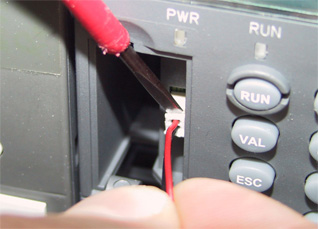
Remove the old TA521 adapter cable with button cell from the compartment by pulling it by the small cable. Remove then the small connector from the socket, do this best by lifting it out with a screwdriver.
-
Follow the previous instructions to insert a new TA521.
|
Parameter |
Value |
||
|---|---|---|---|
|
Nominal voltage |
3 V |
||
|
Nominal capacity |
560 mAh |
||
|
Temperature range (index below C0) |
Operating: 0 °C ... +60 °C Storage: -20 °C ... +60 °C Transport: -20 °C ... +60 °C |
||
|
Temperature range (index C0 and above) |
Operating: -40 °C ... +70 °C Storage: -40 °C ... +85 °C Transport: -40 °C ... +85 °C |
||
|
Primary lithium button cell lifetime |
Typ. 3 years at +25 °C |
||
|
Self-discharge |
2 % per year at +25 °C 5 % per year at +40 °C 20 % per year at +60 °C |
||
|
Protection against reverse polarity |
Yes, by mechanical coding of the plug. |
||
|
Insulation |
The adapter cable with button cell is completely insulated. |
||
|
Connection |
Red = positive pole = above at plug, black = negative pole, |
||
|
Weight |
7 g |
||
|
Dimensions |
Diameter of the adapter cable with button cell: 24.5 mm Thickness of the adapter cable with button cell: 5 mm |
Ordering data
|
Part no. |
Description |
Product life cycle phase *) |
|---|---|---|
|
1SAP 180 300 R0001 |
TA521, adapter cable with primary button cell |
Active |
*) Modules in lifecycle Classic are available from stock but not recommended for planning and commissioning of new installations.