


|
This is the web edition of the original ⮫ AC500-S safety user manual, version 1.3.2. This web edition is provided for quick reference only. The original safety user manual must be used to meet functional safety application requirements. |
|
Standards |
Requirements |
|---|---|
|
ISO 13849-1:2015 |
6.2.6 Category 3 6.2.7 Category 4 Appendix E.1 |
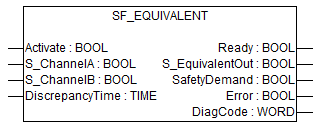
This function block converts two equivalent BOOL inputs (both NO or NC) to one BOOL output, including discrepancy time monitoring. This FB should not be used stand-alone since it has no restart interlock. It is required to connect the output to other safety related functionalities.
|
Name |
Data type |
Initial value |
Description, parameter values |
|---|---|---|---|
|
VAR_INPUT |
|||
|
Activate |
BOOL |
FALSE |
|
|
S_ChannelA |
BOOL |
FALSE |
Variable. Input A for logical connection. FALSE: Contact A open. TRUE: Contact A closed. |
|
S_ChannelB |
BOOL |
FALSE |
Variable. Input B for logical connection. FALSE: Contact B open. TRUE: Contact B closed. |
|
DiscrepancyTime |
TIME |
T#0ms |
Constant. Maximum monitoring time for discrepancy status of both inputs. |
|
VAR_OUTPUT |
|||
|
Ready |
BOOL |
FALSE |
|
|
S_EquivalentOut |
BOOL |
FALSE |
Safety related output. FALSE: Minimum of one input signal = "FALSE" or status change outside of monitoring time. TRUE: Both input signals "active" and status change within monitoring time. |
|
SafetyDemand |
BOOL |
FALSE |
Optional. |
|
Error |
BOOL |
FALSE |
|
|
DiagCode |
WORD |
16#0000 |
|
Typical timing diagrams
Fig. 478: Typical timing diagram for SF_Equivalent
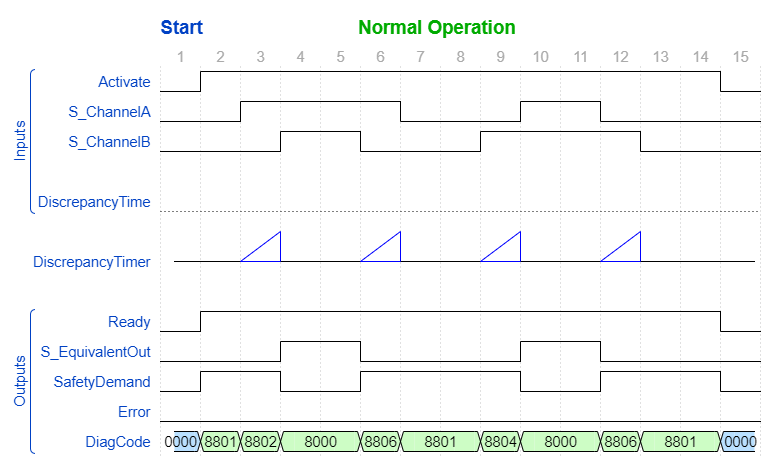
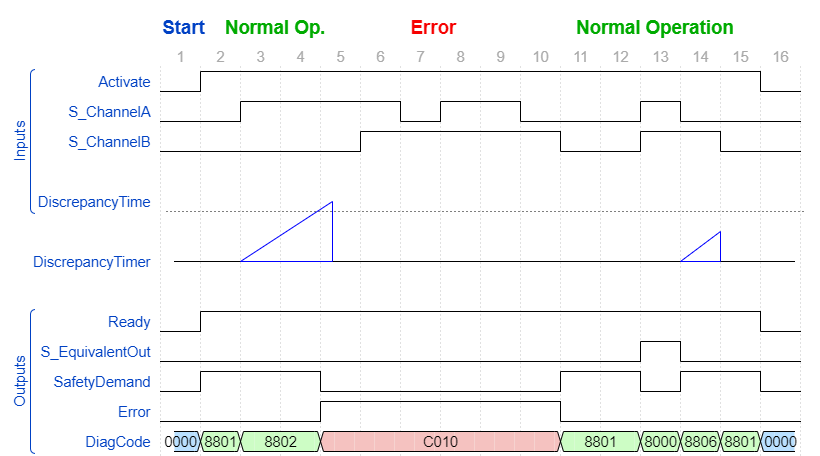
Fig. 479: Typical timing diagram for SF_Equivalent with exceeding the DiscrepancyTime
Error detection
The function block monitors the discrepancy time between channel A and B, when switching to TRUE and also when switching to FALSE.
Error behavior
S_EquivalentOut is set to FALSE. Error is set to TRUE. DiagCode indicates the error states. There is no reset defined as an input coupled with the reset of an error. If an error occurs in the inputs, a new set of inputs with correct S_EquivalentOut must be able to reset the error flag. (Example: If a switch is faulty and replaced, using the switch again results in a correct output.)
Function block-specific error and status codes
|
DiagCode |
State name |
State description and output setting |
|---|---|---|
|
C010 |
Error 1 |
Discrepancy time elapsed in state 8802. Ready = TRUE S_EquivalentOut = FALSE SafetyDemand = FALSE Error = TRUE |
|
C020 |
Error 2 |
Discrepancy time elapsed in state 8804. Ready = TRUE S_EquivalentOut = FALSE SafetyDemand = FALSE Error = TRUE |
|
C030 |
Error 3 |
Discrepancy time elapsed in state 8806. Ready = TRUE S_EquivalentOut = FALSE SafetyDemand = FALSE Error = TRUE |
|
DiagCode |
State name |
State description and output setting |
|---|---|---|
|
0000 |
Idle |
The function block is not active (initial state). Ready = FALSE S_EquivalentOut = FALSE SafetyDemand = FALSE Error = FALSE |
|
8801 |
Init |
An activation has been detected by the FB and the FB is now activated. Ready = TRUE S_EquivalentOut = FALSE SafetyDemand = TRUE Error = FALSE |
|
8000 |
Safety Output Enabled |
The inputs switched to TRUE in equivalent mode. Ready = TRUE S_EquivalentOut = TRUE SafetyDemand = FALSE Error = FALSE |
|
8802 |
Wait for Channel B |
Channel A has been switched to TRUE - waiting for channel B; discrepancy timer started. Ready = TRUE S_EquivalentOut = FALSE SafetyDemand = TRUE Error = FALSE |
|
8804 |
Wait for Channel A |
Channel B has been switched to TRUE - waiting for channel A; discrepancy timer started. Ready = TRUE S_EquivalentOut = FALSE SafetyDemand = TRUE Error = FALSE |
|
8806 |
From Active Wait |
One channel has been switched to FALSE; waiting for the second channel to be switched to FALSE, discrepancy timer started. Ready = TRUE S_EquivalentOut = FALSE SafetyDemand = TRUE Error = FALSE |