


Configuration for AC500-eCo CPU
-
In the device tree, right-click the “COM (<Empty>)” node under “Interfaces” and select “Add object”.
-
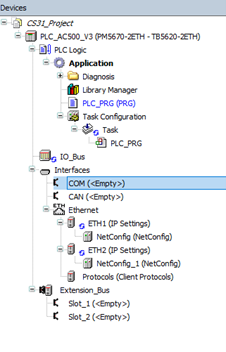
Select the the “COM1” interface and confirm.
-
Right-click the “CAA_SerialCom” node and select “Add object”.
-

Select the “CS31-Bus” node and confirm.
Configuration for CPU
For AC500-eCo V3 CPUs,the TA5142-RS485(I) option board for the RS485 serial interface must be used. Depending on the AC500-eCo V3 CPU type, several option boards are available. A separate instance of the CS31 protocol can be configured below each RS485 option board node.
-
In the device tree, right-click an empty slot under the “Interfaces” node and select “Add object”.
-

Select an RS485 option board and confirm.
-
Right-click the option board and select “Add object”.
-

Select the “CS31-Bus” node and confirm.
Parameters
Double-click the “CS31_Bus” node to configure the parameters.
The following parameter is available for the CS31 bus.
|
Parameter |
Default value |
Value |
Description |
|---|---|---|---|
|
Run on config fault |
No |
No |
The PLC program is executed even if there are configuration faults. |
|
Yes |
The PLC program is not executed even if there are configured faults. |