


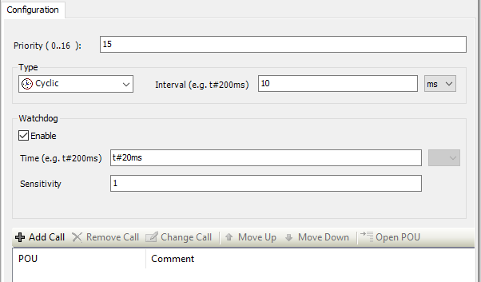
If a new project is created or a new task is inserted in the task configuration , the task is created with the “default task settings” priority = 15 and cycle time = 10 ms. The watchdog is activated, set to 20 ms and sensitivity = 1.
The watchdog handling depends also on the setting of the CPU parameter “Missed cycle behavior”:
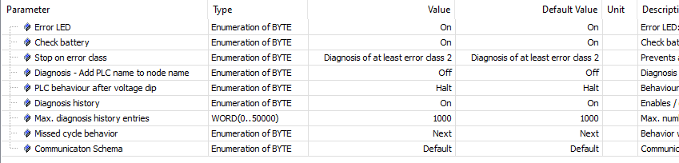
This parameter configures the behavior of a real-time task if the processing time of the task is longer than the cycle time.
“Next” means – skip the missed cycle and start the task on the next cycle on time. This might result in skipped tasks, but at least the highest priority task is always started on time, if it is not skipped (= default value).
“ASAP” means - start the task immediately when possible.
This parameter is valid for all real-time tasks (priorities 0 ... 15) of the PLC application.
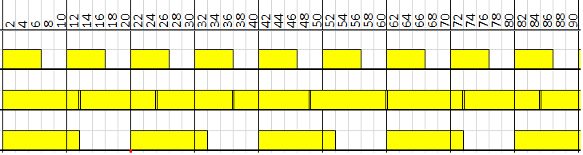
Example 1: default task settings, tTask – processing time of the task in [ms]
|
tTask |
Par. |
 |
|
6 |
Next |
|
|
12 |
ASAP |
|
|
12 |
Next |
No watchdog occurs, also if the processing time of the task is longer than the cycle time (cases 2 and 3) since the processing time is shorter than the watchdog time.
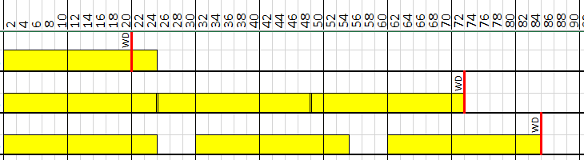
Example 2: default task settings, tTask – processing time of the task 24 ms, SWD – sensitivity of the watchdog
|
SWD |
Par. |
 |
|
1 |
Next |
|
|
3 |
ASAP |
|
|
3 |
Next |
Watchdog occurs in all 3 cases since the processing time of the task is longer than the watchdog time. According to the setting of the sensitivity the watchdog occurs after 1 or 3 cycles.
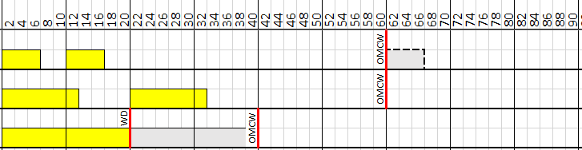
Beside the task watchdog there is the so-called “omitted cycle watchdog” (OMCW). The omitted cycle watchdog is only active if a watchdog has been configured for the task.
The "normal" Watchdog triggers only if the processing time of the task exceeds the set Watchdog value.
The omitted cycle watchdog on the other hand checks completely "failed" cycles. E.g. if the scheduler has a problem and the task never executes its cycle again, then the "normal" watchdog will not be triggered. Therefore, the run time does an additional check, if a task has been executed within the double cycle time or the double watchdog time (the bigger of both is valid). If not, the omitted cycle watchdog is triggered.
Example 3: default task settings, tTask - processing time of the task in ms, Clost - lost cycles
|
tTask |
Clost |
 |
|
6 |
3 ... 6 |
|
|
12 |
3 ... 6 |
|
|
¥ |
2ff |
Omitted cycle watchdog occurs after double watchdog time (2 x 20 ms = 40 ms).
Example 4: Two tasks with following settings:
|
Task |
Priority |
Cycle time [ms] |
Watchdog time [ms] |
Sensitivity |
Parameter |
Task processing time [ms] |
|---|---|---|---|---|---|---|
|
1 |
10 |
10 |
20 |
1 |
Next |
6 |
|
2 |
15 |
50 |
50 |
1 |
30 |
|
Task |
 |
|
1 |
|
|
2 |
Watchdog of task 2 is triggered since the task cannot run in the defined task cycle.
Example 5: Two tasks with following settings
|
Task |
Priority |
Cycle time [ms] |
Watchdog time [ms] |
Sensitivity |
Parameter |
Task processing time [ms] |
|---|---|---|---|---|---|---|
|
1 |
10 |
10 |
20 |
1 |
ASAP |
12 |
|
2 |
15 |
30 |
60 |
1 |
6 |
|
Task |
 |
|
1 |
|
|
2 |
Watchdog of task 2 is triggered since the task cannot start in the defined task cycle.
Example 6: Two tasks with following settings
|
Task |
Priority |
Cycle time [ms] |
Watchdog time [ms] |
Sensitivity |
Parameter |
Task processing time [ms] |
|---|---|---|---|---|---|---|
|
1 |
10 |
10 |
20 |
1 |
Next |
12 |
|
2 |
15 |
30 |
60 |
1 |
6 |
|
Task |
 |
|
1 |
|
|
2 |
No watchdog is triggered, but task 1 is running in 20 ms cycle instead of configured 10 ms cycle. Task 2 is running alternating every 20 ms or 40 ms.