Requirement: The project contains a visualization and a main visualization. The main visualization contains an element that the visualization references.
-
Open the visualization.
-
Click “Visualization Interface Editor”.
-
Declare a variable in the interface editor.
The visualization has an interface and the “Updating the Frame Parameters” dialog appears.
-
Assign a type-compliant transfer parameter to the interface variables in all calls by entering an application variable in “Value”. Exit the dialog.
A transfer parameter is assigned at the points where the visualization is to be referenced. These now appear in the main visualization in the “References” property.
Example
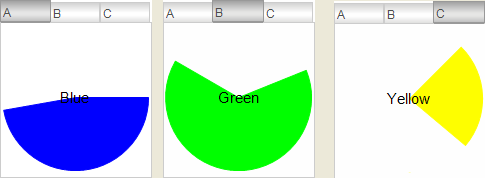
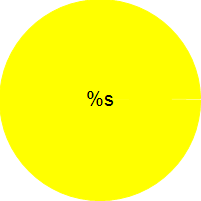
The visPie visualization contains an animated, colored pie. The visMain main visualization calls the visPie visualization multiple times in “Tabs”. Color information, angle information, and label are transferred via the pieToDisplay interface variable. The pies vary at runtime.
Visualization visPie:
|
“Variable for begin” |
|
|
“Variable for end” |
|
|
“Texts Text” |
%s |
|
“Text variables Text variable” |
|
|
“Color variable Normal state” |
|
Interface of the visualization visPie:
                            VAR_IN_OUT
                            pieToDisplay : DATAPIE;
                            END_VAR
Main visualization :
|
“References” |
|
|
“visPie” |
|
|
“Heading” |
|
|
|
|
|
“visPie” |
|
|
“Heading” |
|
|
|
|
|
“visPie” |
|
|
“Heading” |
|
|
|
|
DATAPIE (STRUCT)
TYPE DATAPIE : // Parameter type used in visPie
STRUCT
    dwColor : DWORD; // Color data
    iStart : INT; // Angle data
    iEnd : INT;
    sLabel : STRING;
END_STRUCT
END_TYPE
GVL
{attribute 'qualified_only'}
VAR_GLOBAL CONSTANT
    c_dwBLUE : DWORD := 16#FF0000FF; // Highly opaque
    c_dwGREEN : DWORD := 16#FF00FF00; // Highly opaque
    c_dwYELLOW : DWORD := 16#FFFFFF00; // Highly opaque
    c_dwGREY : DWORD :=16#88888888; // Semitransparent
    c_dwBLACK : DWORD := 16#88000000; // Semitransparent
    c_dwRED: DWORD := 16#FFFF0000;  // Highly opaque
END_VAR
PLC_PRG
PROGRAM PLC_PRG
VAR
    iInit: BOOL := TRUE;
    pieA : DATAPIE; // Used as argument when visPie is called
    pieB : DATAPIE;
    pieC : DATAPIE;
    iDegree : INT; // Variable center angle for the pie element used for animation
END_VAR

IF iInit = TRUE THEN
    pieA.dwColor := GVL.c_dwBLUE;
    pieA.iStart := 0;
    pieA.sLabel := 'Blue';

    pieB.dwColor := GVL.c_dwGREEN;
    pieB.iStart := 22;
    pieB.sLabel := 'Green';

    pieC.dwColor := GVL.c_dwYELLOW;
    pieC.iStart := 45;
    pieC.sLabel := 'Yellow';

    iInit := FALSE;
END_IF
iDegree := (iDegree + 1) MOD 360;
pieA.iEnd := iDegree;
pieB.iEnd := iDegree;
pieC.iEnd := iDegree;
Main visualization visMain at runtime: