


With this command you open the dialog box for assigning access rights to the different 'user groups'. The following dialog box appears:
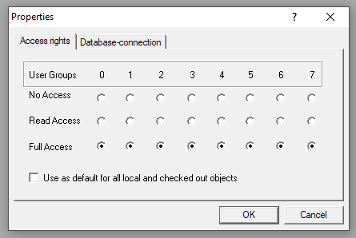
Members of the user group 0 can now assign individual access rights for each user group. There are three possible settings:
-
No Access: the object may not be opened by a member of the user group.
-
Read Access: the object can be opened for reading by a member of the user group but not changed.
-
Full Access: the object may be opened and changed by a member of the user group.
The settings refer either to the currently-selected object in the 'Object Organizer' or, if the option 'Apply to all' is chosen, to all POUs, data types, visualizations, and resources of the project.
The assignment to a user group takes place when opening the project through a password request if a password was assigned to the user group 0.
Please regard also the possibility to assign access rights concerning the operation of visualization elements (Visualization, Security).