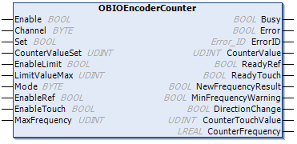
OBIOEncoderCounter
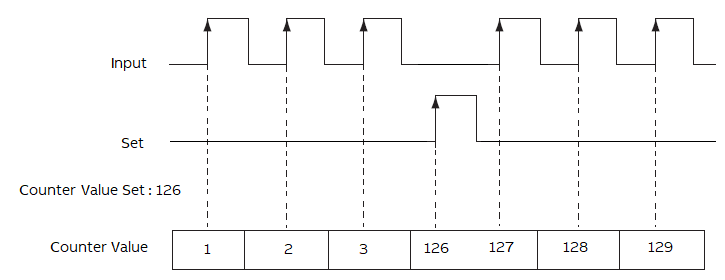
If “Enable” is TRUE, the “OBIOEncoderCounter” instruction increments the counter by one base on the input.
If “Set” bit is TRUE, the “OBIOEncoderCounter” instruction moves the “CounterValueSet” to the “CounterValue”.
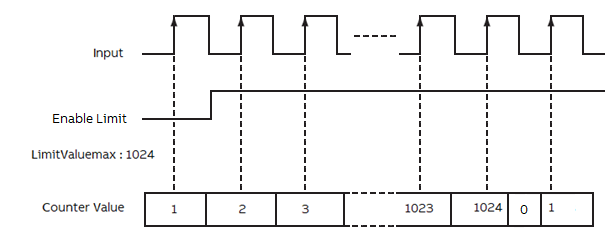
If “Enable” is TRUE, the “OBIOEncoderCounter” instruction increments the counter by one based on the input.
If “EnableLimit” bit is TRUE, the accumulated value continues incrementing.
After “CounterValue” reaches the “LimitValueMax”, the “OBIOEncoderCounter” instruction writes 0 to the “CounterValue”.
“Encoder Counter Mode”: 0 = “90° Mode”
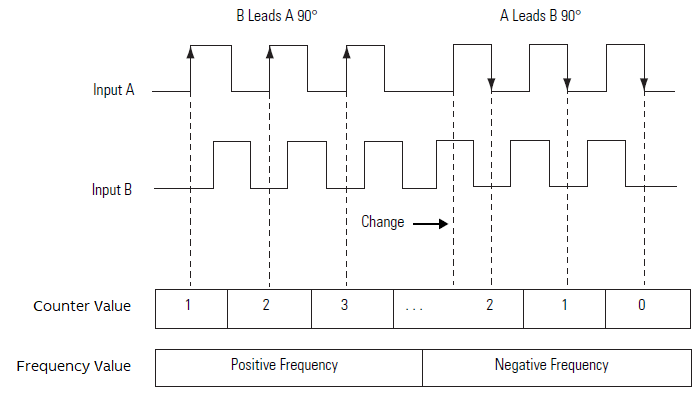
In this encoder counter mode, an increasing count results when input B is 90° ahead of input A.
The count is initiated on the rising edge of input A, and the direction of the encoder is clockwise (positive).
The module produces a decreasing count when input A is 90° ahead of input B.
The count is initiated on the falling edge of input A, and the direction is counterclockwise (negative).
By monitoring both the number of pulses and the phase relationships of input A and B, you can accurately determine the position and direction of the rotation.
“Encoder Counter Mode”: 1 = “pulse/direction”
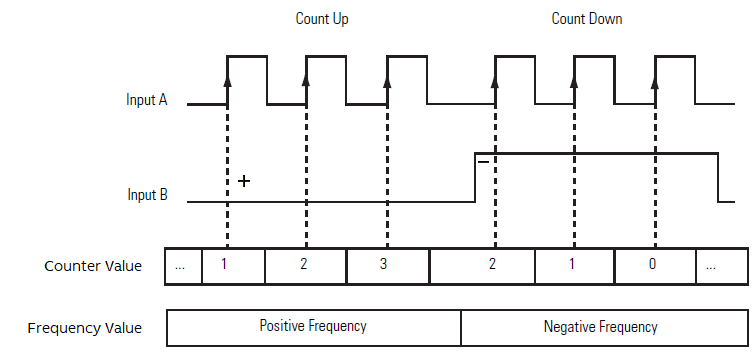
In this encoder counter mode, the count increases or decreases based on the state of input B, which can be a random signal.
If input B is high, the counter will count down.
If input B is low the counter counts up.
Counting is done on the leading edge of input A.
If “Enable” is TRUE, the “OBIOEncoderCounter” instruction increments the counter by one based on the input.
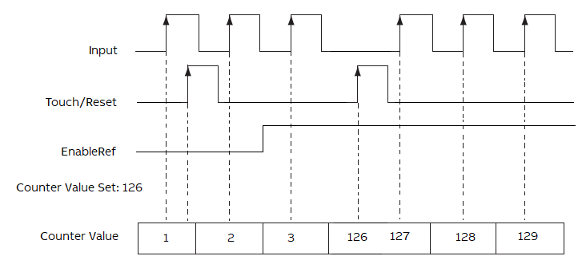
If “EnableRef” bit is TRUE, the “OBIOEncoderCounter” instruction is ready to receive the touch/reset input.
If the “Touch/Reset” input is TRUE, the current “CounterValue” will be replaced by the “CounterValueSet”.
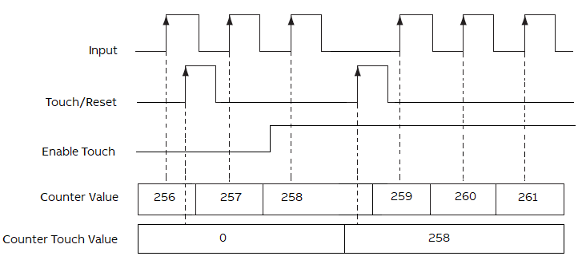
If “Enable” is TRUE, the “OBIOEncoderCounter” instruction increments the counter by one based on the input.
If “EnableTouch” bit is TRUE, the “OBIOEncoderCounter” instruction is ready to receive the “Touch/Reset” input.
If the “Touch/Reset” input is TRUE, the current “CounterValue” will be captured and written to the “CounterTouchValue”.