


A network scan lists all devices that are found in the network during the scan process, i.e. ABB devices such as AC500 processor modules, AC500 communication interface modules and ABB drives.
-
Start the IP configuration tool in Automation Builder (“Tools IP-Configuration”) or start it stand-alone (*.exe).
-
The “IP-Configuration” dialog opens. Define the device type for the network scan by selecting the required option under “Scan Protocol”:
-
“ABB Net config protocol”:
Use this option for AC500 devices such as processor modules, CI5xx-Modbus devices or ABB drives. The device(s) to be scanned must be connected to the PC via a direct Ethernet connection.
-
“Profinet Dynamic Configuration Protocol (DCP)”:
Use this option for PROFINET communication interface modules. The devices must be connected to the PC via a direct Ethernet connection (not via CM579).
For this scan, a NPcap driver needs to be installed separately.
-
“EtherCAT”:
Use this option for EtherCAT communication interface modules. The Ethernet cable must be connected directly to the first EtherCAT slave device of the EtherCAT fieldbus. Ensure that no EtherCAT master device is available on the bus when a scan is performed.
“Emergency” option: Enable this option to detect failures in the EtherCAT assembly during the scan process, i.e. frame loss or interchanged ports. Detected errors are displayed.
For the scan, a NPcap driver needs to be installed separately.
-
-
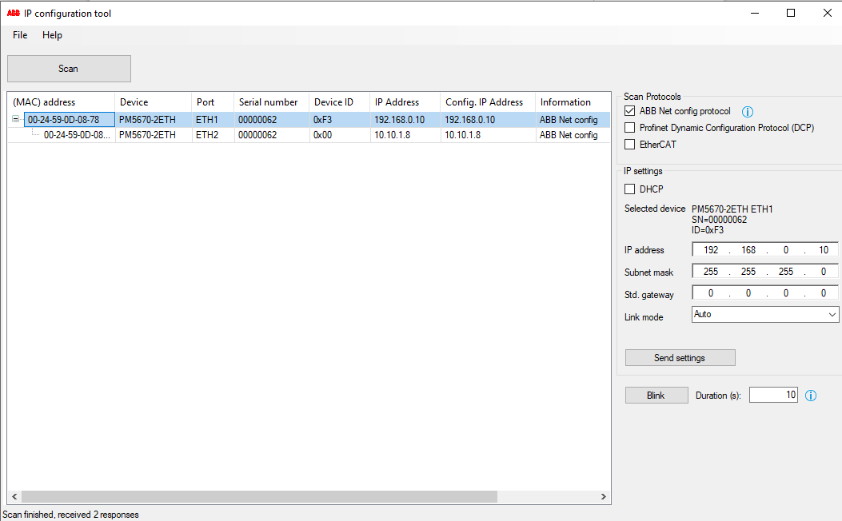
Select [Scan] to start the scan process.
-
All devices detected in the network are listed, including hardware and connection details. The following details can be modifies under “IP settings”:
-
“IP Address”:
Current IP address of the device.
-
“Conf. IP Address”:
Configured IP address of the device. A changed IP address will update this column.
-
“FW Version”:
Current firmware version installed of the device. This field is visible only after the first network scan. If the field remains empty after a network scan, check on connection errors.
The IP address of some devices, e.g. EtherCAT devices, cannot be changed.
-