


Prerequisite: To import third party devices from ECAD to Automation Builder, install third party fieldbus devices (for example, GSD, GSDML and EDS files) using “Tools Device repository” in Automation Builder.
-
From the main menu, select “Project Import ECAD (PBF)”.
-
From the file system, select the ECAD pbf file which consists of third party devices.
When the device identifier of the third party device installed in Automation Builder does not match with the device identifier of the device imported from ECAD, an error window is shown with the devices which are failed to import with error identifier 14.
To import third party devices, it is required to assign ECAD identifier (PLC type designation/order number) in Automation Builder in “Tools Device ECAD data”. Click the link in the Import window to see the error messages in a text file.
-
Click “Continue” in the Import window to import valid devices to the project that are imported successfully or click “Cancel” to cancel the import process.
-
In Automation Builder, click “Tools Device ECAD data”.
-
In the Device ECAD data editor, add the ECAD identifier for the devices shown in the import errors window with error identifier 14, to enable these devices for export and import.
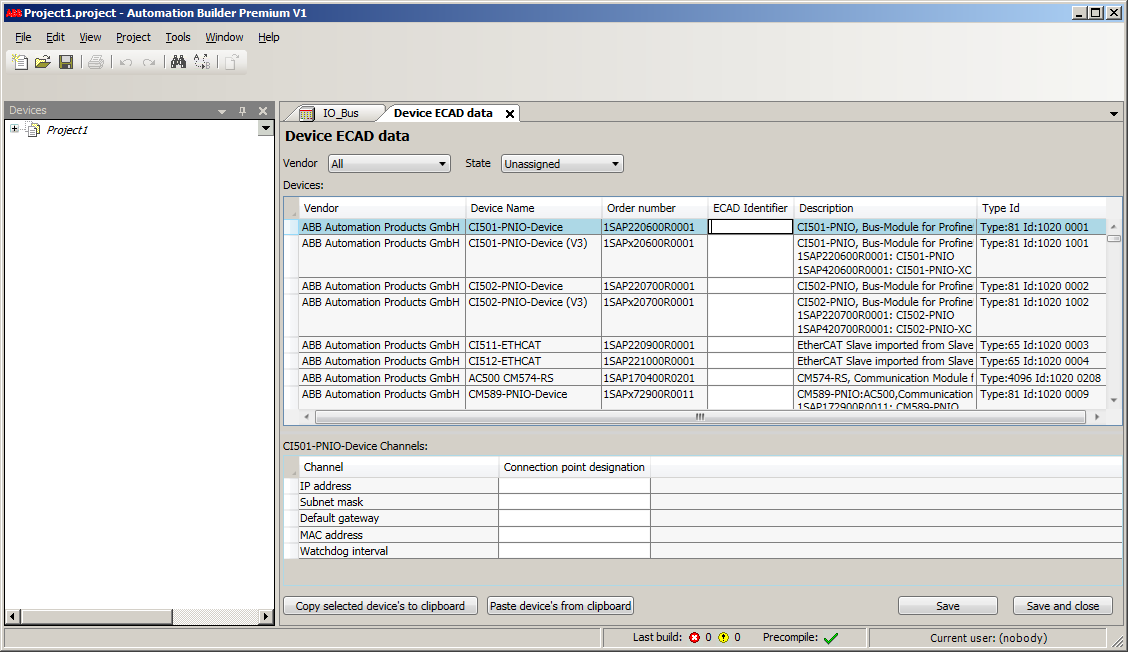
Also, add the ECAD identifiers for all devices which need to support export/import in ECAD.
-
Reimport the pbf file to import the third party devices.