


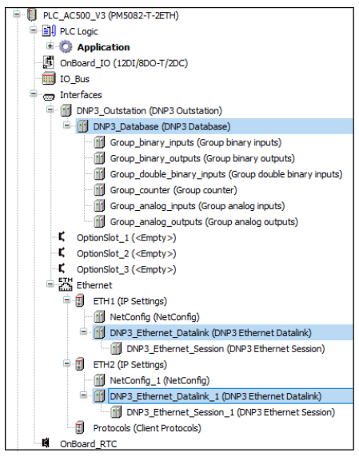
AC500 V3 outstation can connect to maximum eight DNP3 masters in parallel. These connections can be configured on the Ethernet ports as DNP3 sessions. Each session can be configured with same or different databases containing data points from different object groups.
-
Under the Ethernet session, user can configure the parameters of session to establish the communication between master and Outstation.
-
Also, secure authentication features for each session can be configured too.
-
With the mapping option from session to databases, user can select different set of datapoints which can be polled between different masters, example local, zonal and regional masters.
-
In the multi session configuration, source and destination address needs to be defined unique within the Ethernet interface. For example: in ETH1 if there are more than 1 session, both source and destination address must be unique in each session.
Databases:
-
Under the Interfaces, user can configure up to eight databases and under each database, object groups configuration can be done.
-
Using the “In use” selection for each datapoints, user can decide whether it can be polled between master and Outstation.
-
Thee chapter “Object groups” explains the different object groups and its variations supported. Accordingly same can be configured for each datapoints under databases.
-
It is also possible to use the “Import & Export” option under database or object groups. This will provide the option to do bulk engineering in a CSV file.