


For medium or large HA systems the configuration with communication interface modules and redundancy is done by the following steps. For details see the example documentations:
-
Install the hardware ⮫ “Hardware, requirements and options overview”.
-
Select the CPUs based on the requirements ⮫ “CPU choice, system size and performance indications”.
-
Install Automation Builder including the latest libraries ⮫ “Hardware, requirements and options overview”.
-
Install the Bulk Data Manager tool (BDM) ⮫ “How to get and install the AC500 High Availability system package”.
-
Create a new project in Automation Builder for the chosen CPUs.
-
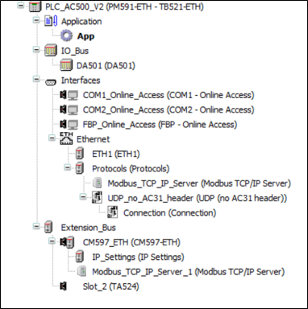
Configure the required Modbus and UDP configuration in the Automation Builder device tree of the CPU. UDP settings are only required in AC500 PLCs.
-
For UDP in AC500 PLC, configure “UDP_no_AC31_header” and define the port number as '3000'.

-
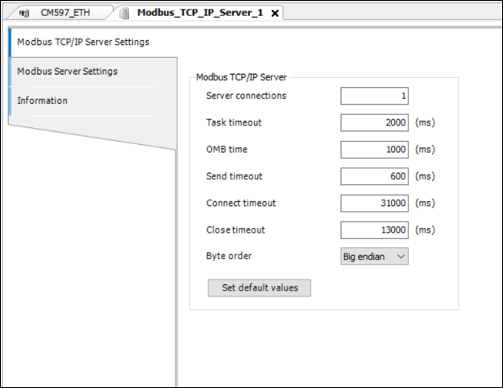
In AC500 PLCs for each CM597-ETH communication module added the “Send timeout” value has to be changed to 600 ms for the Modbus TCP server.
-
Assign the IP addresses in ³ 2 different Ethernet networks:
-
SCADA network: SCADA, connected PLC A and PLC B.
-
Field network: connected CI52x module(s).
-
-
Configure a network switch in the field network (if managed /redundant) based on network redundancy required ⮫ “Field I/O network topologies”.
-
Run BDM tool to configure CI52x network.
-
Export the files. Refer for details in the document: %ALLUSERSPROFILE%\Documents\Automation Builder Examples\PS5601-HA-MTCP\BulkDataManager\Documentation.
-
Import the Bulk data export files to the Automation Builder project.
-
Add Modbus TCP configuration for the ETH ports.
-
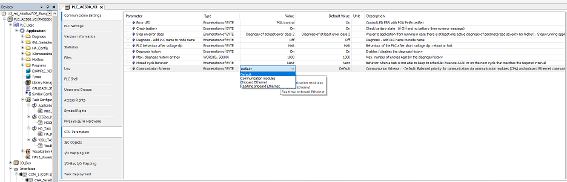
For the system with V3 PLCs, set the Communication Schema to “Onboard Ethernet” “CPU Parameters” for better performance.
-
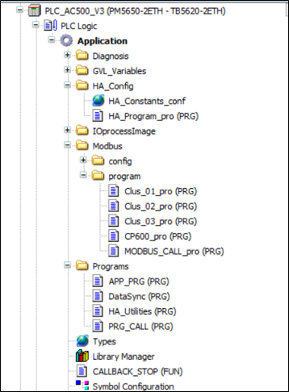
Add Callback stop function HA_MOD_CALLBACK_STOP and call it in the system event “stop”.
-
Add optional HA utility function blocks or function block HA_MOD_DATASYNC.
-
Add the task configuration ⮫ “Task configuration recommendations for HA system”.
-
Activate the runtime license if it is a V3 PLC to enable HA system⮫ “PLC runtime licensing”.
-
Compile and download to both PLCs (simplified in V3 via integrated download manager).
-
Create a boot project, restart the complete system and RUN.
-
Check the precondition before operation: after restart confirm the listed global variables values are same in both PLC. If both PLC has same values, synchronization is established properly.
I. xHaModDataErr
II. wHaModDataErNo
III. xHaModErr
IV. iTotalSyncData
-
Operation: Test use cases (e.g. by putting the primary PLC to STOP mode and observe the switchover).
-
For different use cases and behavior refer to 'Failures and use cases'⮫ “Failures and use cases”.
-
Runtime error and diagnosis function block can be used to monitor the system⮫ “Diagnosis”.