The input and output variables of a function block can be accessed from another POU by setting up an instance of the function block and specifying the desired variable using the following syntax:
<Instance name>.<Variable name>
Assigning parameters at call
If you would like to set input and/or output parameters when you call the function block, you can do this in the supported text languages by assigning values to the parameters after the instance name of the function block in parentheses (for input parameters this assignment takes place using ":=" just as with the initialization of variables at the declaration position, for output parameters "=>" is to be used).
If the instance is inserted via input assistant ([F2]) with option With arguments in the implementation window of a ST POU, it will be displayed automatically according to this syntax with all of its parameters. But you not necessarily must assign these parameters.
Example
FBINST is a local variable of type of a function block, which contains the input variable xx and the output variable yy. When FBINST is inserted in a ST program via input assistant, the call will be displayed as follows and then can be supplemented with the desired values: FBINST1(xx:= , yy=> );
InOutVariables at call:
Please regard, that the InOutVariables (VAR_IN_OUT) of a function block are handed over as pointers. For this reason in a call of a function block no constants can be assigned to VAR_IN_OUTs and there is no read or write access from outside to them.
Example
Calling a VAR_IN_OUT variable inout1 of function block fubo in a ST module:
VAR
 fuboinst:fubo;
 iVar1:int;
END_VAR
iVar1:=2;
fuboinst(iInOut1:=iVar1);
not allowed in this case: "fuboinst(iInOut1:=2);" or "fuboinst.iInOut1:=2;"
Examples for calling function block FUB
Declaration part
  FUNCTION_BLOCK FUB
  VAR_INPUT
      iPAR1:INT;
      iPAR2:INT;
  END_VAR
  VAR_OUTPUT
    iMELERG:INT;
    xVERGL:BOOL;
  END_VAR
Implementation part in AWL
  LD iPar1
  MUL iPar2
  ST iMulErg

  LD iPar1
  EQ iPar2
  ST xVergl
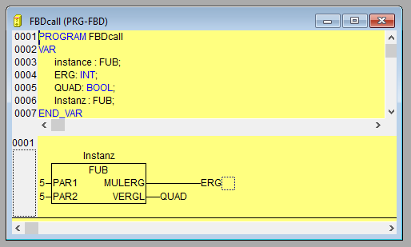
The multiplication result is saved in the variable ERG, and the result of the comparison is saved in QUAD. An instance of FUB with the name INSTANCE is declared.
Examples for calling FUB
Declaration for all examples
  PROGRAM AWLaufruf
  VAR
        xQuad :      BOOL;
        fubinstanz : FUB;
        iErg:        INT:=0;
  END_VAR
Calling FUB in ST
  PROGRAM STaufruf
  fubinstanz(iPar1:=5;iPar2:=5);   bzw. fubinstanz;
  QUAD:=fubinstanz.xVergl;
  ERG:=funbinstanz.iMulErg;
Calling FUB in FBD