


The visualization editor opens when you double-click a visualization object.
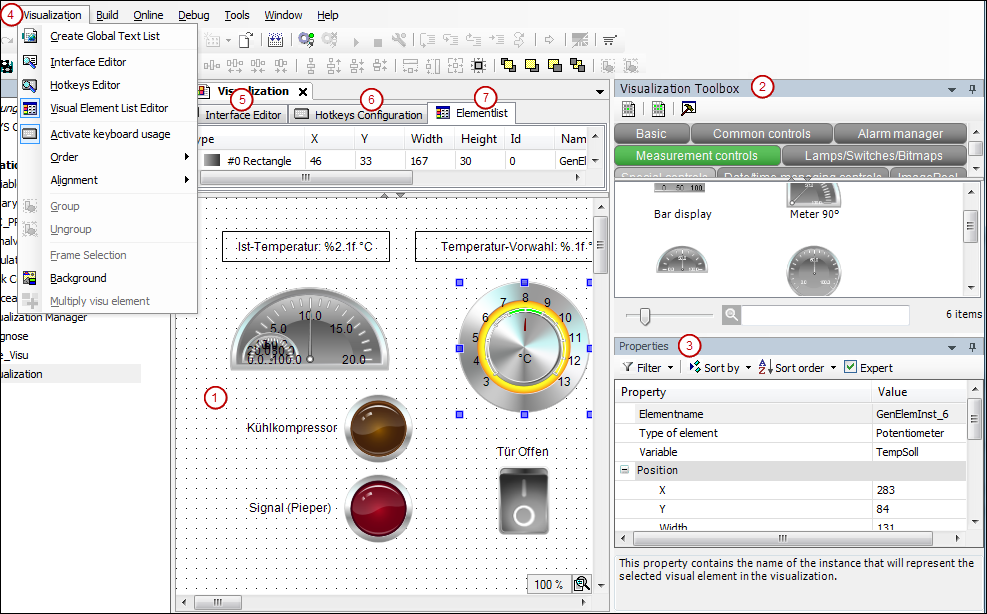
-
(1) Graphical editor: Here you create the visualization from the visualization elements which are provided in the visualization toolbox view.
-
(2) View “Visualization Toolbox”: available visualization elements
-
(3) View “Properties”: Configuration editor for the visualization element currently selected in the editor area
-
(4) Menu “Visualization”: Commands for working in the visualization editor
The “Visualization” menu contains, for example, commands for opening additional editors.
-
(5) “Interface Editor”: Declaration of variables which can be used to parameterize references of the visualization.
-
(6) “Hotkeys Configuration”: Definition of keyboard shortcuts for inputs on the visualization in online mode.
-
(7) “Element List”: List of all elements used in the visualization; possibility to change their position on the Z-axis.