


See the general description for information about the following tabs of the device editor.
An additional separate help page for the relevant device editor is available only in the case of special features.
If the "<device name> Parameters" tab is not displayed, then select the “Show generic device configuration editors” option in the CODESYS options, in the “Device editor” category.
With the KNX editor from CODESYS, you define the communication objects of your building automation. The communication objects are exported and made available to the ETS5 program. Linking the communication objects to the different KNX devices is performed exclusively in the ETS5 program. Therefore, only the objects are generated in CODESYS . The objects are linked to variables from the PLC program by means of “I/O Mapping”.
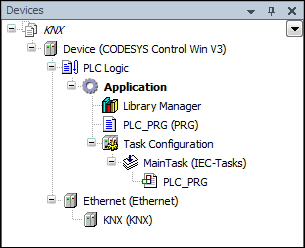
You add an Ethernet adapter below the controller. Then you add the KNX device below the adapter. You can insert only one KNX device per controller.
For more information about the device editor, see: ⮫ Dialog: Options – Device editor.