


Symbol: 
Function: This command allows for connecting a structure member to a scalar type input.
Call: Menu bar: “CFC Pins”; context menu: “Pins”
Requirements: A CFC editor is active and a function block input is selected.
The member of the structure that is connected to the input of the subsequent function
block must be provided with the pragma {attribute 'ProcessValue'}. The data type of the structure member has to be compatible with the data type of
the subsequent input. Inputs connected in this way are flagged with the "V" symbol.
Example
TYPE QINT :
STRUCT
	Status : STRING;
	{attribute 'ProcessValue'}
	Value1 : INT;
	Value2 : INT;
END_STRUCT
END_TYPE
PROGRAM PLC_PRG
VAR
	input1: QINT;
	output1: QINT;
	intValue: INT;
END_VAR
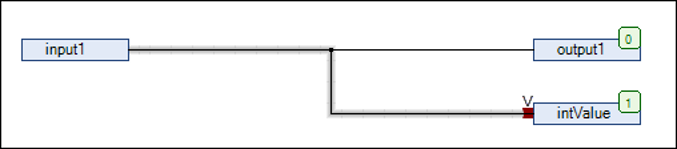
If you do not execute the command “Use attributed member as input” for this link, then a compiler error is issued.
See also