


-
Solid state flash memory storage
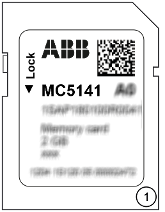
1
MC5141 memory card
The memory card has a write protect switch.
In the position "LOCK", the memory card can only be read.
|
Memory card type |
AC500 V2 |
AC500-XC V2 |
AC500 V3 |
AC500-XC V3 |
AC500-eCo V3 |
||
|---|---|---|---|---|---|---|---|
|
MC5141 |
x |
x |
x |
x |
- |
||
|
MC5102 with TA5350-AD micro memory card adapter |
x 1) |
x 1) 2) |
x |
x 2) |
- |
||
|
MC5102 without TA5350-AD micro memory card adapter |
- |
- |
- |
- |
x |
||
1) As of firmware 2.5.x
2) Temporary use of MC5102 is possible under normal environmental conditions, but MC5141 should be preferred.
The use of other memory cards is prohibited. ABB is not responsible nor liable for consequences resulting from use of unapproved memory cards.
Purpose
Processor modules can be operated with and without (micro) memory card.
Processor modules are supplied without (micro) memory card. It must be ordered separately.
The memory card is used to store or backup application data and/or application programs or project source codes as well as to update the internal CPU firmware.
The memory card is intended for long-term use in standard and XC application.
The memory card can be read/written on a PC with a SDHC compatible memory card reader.
Dimensions
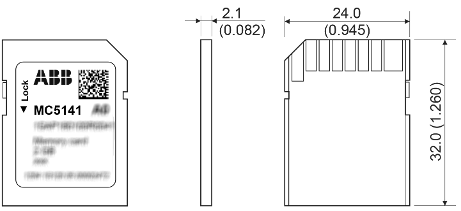
The dimensions are in mm and in brackets in inch.
Insert the memory card
-
Unpack the memory card.
-
Insert the memory card into the memory card slot of the processor module until locked.
Fig. 227: Insert memory card into PM56xx
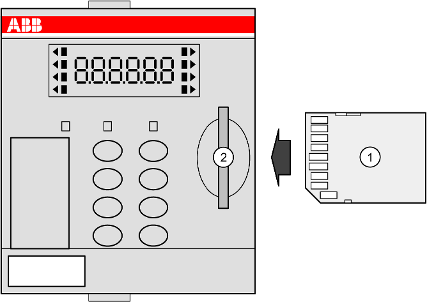
1
Memory card
2
Memory card slot
Remove the memory card

NOTICE
Disturbed PLC operation
Do not remove the memory card when it is working!
Otherwise the memory card and/or files on it might get corrupted and/or normal PLC operation might be disturbed.
-
Remove the memory card only when no black square (
 ) is shown next to MC in the display.
-
To remove the memory card, push on the memory card until it moves forward.
-
By this, the memory card is unlocked and can be removed.
Fig. 228: Remove memory card from PM56xx
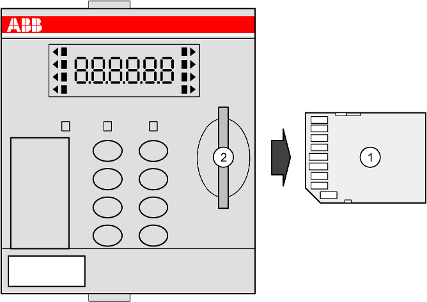
1
Memory card
2
Memory card slot
Technical data
|
Parameter |
Value |
||
|---|---|---|---|
|
Memory capacity |
2 GB |
||
|
Terrabytes written (TBW) |
up to 140 TBW |
||
|
Number of cycle write/erase operations |
up to 70000 |
||
|
Data retention |
|||
|
at beginning |
10 years at +40 °C |
||
|
when number of write processes has been 90 % of lifetime of each cell |
1 year at +40 °C |
||
|
Write protect switch |
Yes, at the edge of the memory card |
||
|
Weight |
2 g |
||
|
Dimensions |
24 mm x 32 mm x 2.1 mm |
||
It is not possible to use 100 % of a device's memory space. About 10 % of the total available space must remain unused at any time to maintain normal device operation.
The specified values represent the frequency with which memory blocks can be written or erased. However, they do not reflect the user's ability to write or erase these blocks. It should be noted that the internal controller may perform certain operations, such as internal management or error correction actions, which may also affect the total number of write/erase cycles.
Temperature is also a critical factor in memory card life. Therefore, it is imperative that the specified limits are not exceeded. In the case of the PLC, the sequential and non-random way of writing data helps to extend the life of the memory cells. And if the memory card is not used to capacity all the time, this can extend the overall life.
Ordering data
|
Part no. |
Description |
Product life cycle phase *) |
|---|---|---|
|
1SAP 180 100 R0041 |
MC5141, memory card |
Active |
*) Modules in lifecycle Classic are available from stock but not recommended for planning and commissioning of new installations.