-
Click menu “Tools Options” and select “Device editor” in the “Options” window.
-
Enable first checkbox “Show generic device configuration views” and click [OK].
Append a CM598-CAN
-
Right-click the required slot below node “Extension_Bus” and click “Add object”.
Dialog “Replace object:” opens.
-
Click “CM598_CAN” in the list and click [Replace object].
-
Double-click “CM598_CAN (CM598-CAN)”.
The editor displays the “CM598-CAN Parameters”.
The following parameters are available.
|
Parameter |
Default value |
Value |
Description |
|---|---|---|---|
|
Run on config fault |
No |
No |
In case of a configuration error, the user program is not started. |
|
Yes |
The user program is started regardless of a faulty configuration of the “CM598-CAN” communication module. |
||
|
CANopen Sync mode |
Sync Bus only |
Sync Bus only |
The “CANopen Manager” sends SYNC messages to “CAN bus” only. The properties of the sync message are configured in the “CANopen Manager” parameters. |
|
Sync Bus and task |
The “CANopen Manager” sends SYNC messages to “CAN bus” and triggers an IEC task. |
The “CAN Bus” tab contains the basic CAN bus settings and special settings for the CAN 2.0 B protocol.
The settings in “29 Bit COB-ID” are valid only for the CAN 2.0 B protocol. Ensure that the “Enable 29 Bit COB-ID” option is enabled. Otherwise, CAN 2.0 B frames cannot be received. The other parameters in “Enable 29 Bit COB-ID” configure the receive filter.
SAE J1939
An example project for the SAE J1939 protocol in PLCs is provided in the application example ⮫ AC500 SAE J1939 protocol.
|
Parameter |
Default value |
Value |
Description |
|---|---|---|---|
|
Bus parameters |
|||
|
Transmission rate |
250 kBit/s |
10 kBit/s 20 kBit/s 50 kBit/s 100 kBit/s 125 kBit/s 250 kBit/s 500 kBit/s 800 kBit/s 1000 kBit/s |
Transmission speed in [kBit/s] |
|
Node settings |
|||
|
Stop in case of monitoring error |
Disabled |
Disabled |
The manager does not stop in case of a monitoring error (Node Guarding or Heartbeat Error). A loss of communication with one node does not affect other nodes. The manager tries to reestablish the communication with the affected nodes. |
|
Enabled |
If this function is enabled, the manager also stops the communication with all responding and active nodes. |
||
|
Send “Global Start Node” |
Enabled |
Disabled |
No “Global Start Node” message is sent after configuring the nodes. |
|
Enabled |
A “Global Start Node” message is sent after configuring the nodes. All nodes are synchronized again. |
||
|
29 Bit COB-ID |
|||
|
Enable 29 bit COB-ID |
Disabled |
Disabled |
29 bit CAN-IDs are disabled, but 11 bit CAN-IDs are still enabled. |
|
Enabled |
Additional 29 bit CAN-IDs are enabled. |
||
|
Acceptance mask |
0 |
29 bit |
Specifies the bits of a CAN ID evaluated by the filter. For instance, with an acceptance mask = 0x1FFFFFFF all bits are evaluated. |
|
Acceptance code |
0 |
29 bit |
Specifies the bits of a CAN ID that must be set to pass the filter. Only the bits set in the acceptance mask are relevant. |
The “CM598-CAN I/O Mapping” tab contains the bus cycle option used for CANopen configuration. The following parameters are available.
|
Parameter |
Default value |
Value |
Description |
|---|---|---|---|
|
Bus cycle task |
Use parent bus cycle setting |
Use parent bus cycle settings |
Settings from “PLC settings” tab are used. |
|
Task |
Name of the task that triggers the bus cycle. |
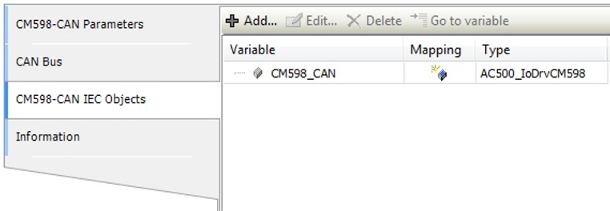
The “CM598-CAN IEC Objects” tab contains the created instance of the I/O driver.