


|
This is the web edition of the original ⮫ AC500-S safety user manual, version 1.3.2. This web edition is provided for quick reference only. The original safety user manual must be used to meet functional safety application requirements. |
|
Standards |
Requirements |
|---|---|
|
IEC 60204-1:2016 |
9.3.6 Suspension of safety functions and/or protective measures Where it is necessary to suspend safety functions and/or protective measures (e.g., for setting or maintenance purposes), protection shall be ensured by:
|
|
ISO 13849-1:2015 |
5.2.2 Manual reset function |
|
ISO 12100:2010 |
6.2.11.2 Starting of an internal power source/switching on an external power supply 6.2.11.4 Restart after power interruption |

This function block provides the interface to a generic actuator, e.g., a safety drive or safety valve, to place the actuator in a safe state.
This FB provides the interface between the safety-related system and a generic actuator. This means that the safety-related functions of the actuator are available within the application program. However, there are only two binary signals to control the safe state of the generic actuator, i.e., one for requesting and one for receiving the confirmation.
The safety function will be provided by the actuator itself. Therefore, the FB only initiates the request, monitors it, and sets the output when the actuator acknowledges the safe state. This will be indicated with the "S_SafetyActive" output.
This FB does not define any generic actuator-specific parameters. They should have been specified in the generic actuator itself. It switches the generic actuator from the operation mode to a safe state.
The additional input S_StartReset offers the possibility of an automatic cold start as it is defined for the other FBs.
|
Name |
Data type |
Initial value |
Description, parameter values |
|---|---|---|---|
|
VAR_INPUT |
|||
|
Activate |
BOOL |
FALSE |
|
|
S_OpMode |
BOOL |
FALSE |
Variable. Requested mode of a generic safe actuator. FALSE: Safe mode is requested. TRUE: Operation mode is requested. |
|
S_Acknowledge |
BOOL |
FALSE |
Variable. Confirmation of the generic actuator, if actuator is in the safe state. FALSE: Operation mode (non-safe). TRUE: Safe mode. |
|
S_StartReset |
BOOL |
FALSE |
|
|
Reset |
BOOL |
FALSE |
⮫ Table 1058 “General input parameters” with the functionality as an error removed acknowledge. |
|
MonitoringTime |
TIME |
T#0s |
Constant. Monitoring of the response time between the safety function request (S_OpMode set to FALSE) and the actuator acknowledgment (S_Acknowledge switches to TRUE). |
|
VAR_OUTPUT |
|||
|
Ready |
BOOL |
FALSE |
|
|
S_SafetyActive |
BOOL |
FALSE |
Confirmation of the safe state. FALSE: Non-safe state. TRUE: Safe state. |
|
S_SafetyRequest |
BOOL |
FALSE |
Request to place the actuator in a safe state. FALSE: Safe state is requested. TRUE: Non-safe state. |
|
SafetyDemand |
BOOL |
FALSE |
Optional. |
|
ResetRequest |
BOOL |
FALSE |
Optional. |
|
Error |
BOOL |
FALSE |
|
|
DiagCode |
WORD |
16#0000 |
|
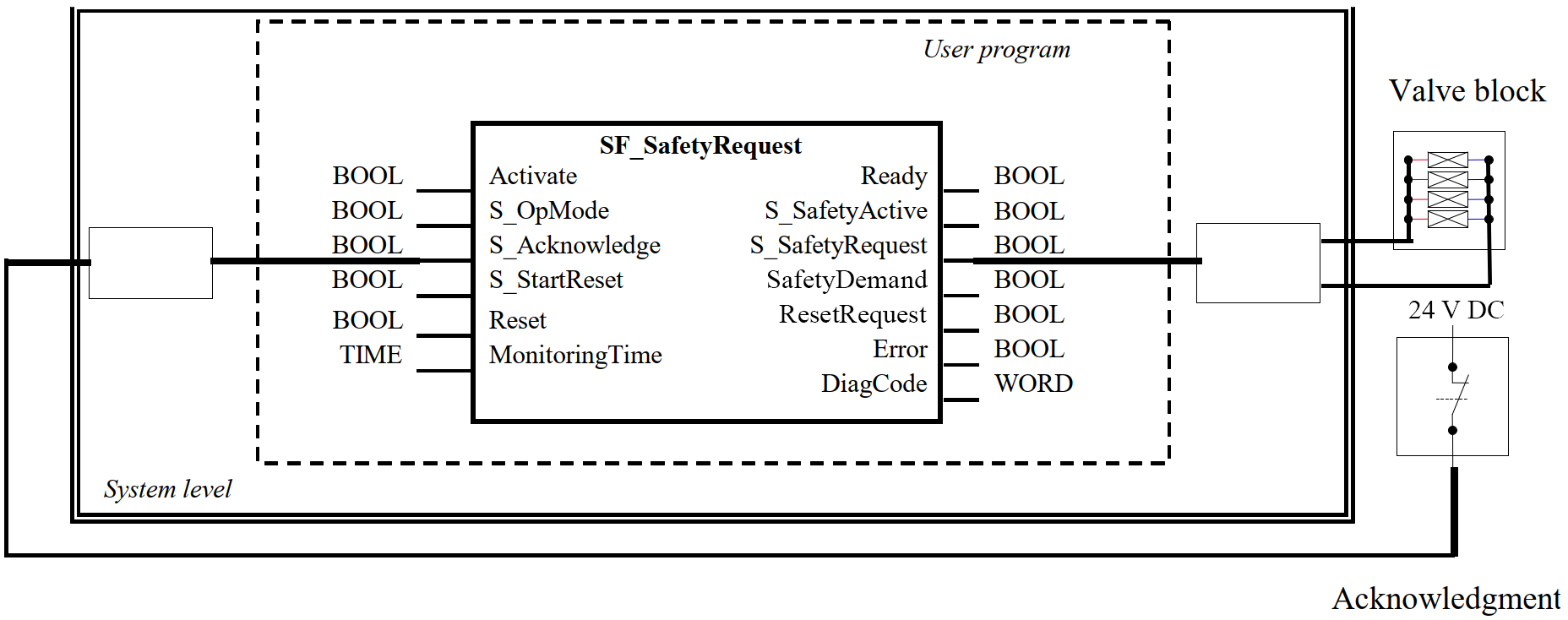
The function block represents the interface between the user program and system environment.
Fig. 511: Example of SF_SafetyRequest
Typical timing diagram
Fig. 512: Typical timing diagram for SF_SafetyRequest

Error detection
The FB detects whether the actuator does not enter the safe state within the monitoring time.
The FB detects whether the acknowledge signal is lost while the request is still active.
The FB detects a static Reset signal.
External FB errors: There are no external errors, since there is no error bits/information provided by the generic actuator.
Error behavior
In the event of an error, the S_SafetyActive output is set to FALSE.
An error must be acknowledged by a rising trigger at the Reset input. To continue the function block after this reset, the S_OpMode request must be set to TRUE or S_Acknowledge must become TRUE.
Function block-specific error and status codes
|
DiagCode |
State name |
State description and output setting |
|---|---|---|
|
C010 |
Acknowledge Lost |
Acknowledgment lost while in the safe state. Ready = TRUE S_SafetyActive = FALSE S_SafetyRequest = FALSE SafetyDemand = FALSE ResetRequest = TRUE Error = TRUE |
|
C020 |
MonitoringTime Elapsed |
S_OpMode request could not be completed within the monitoring time. Ready = TRUE S_SafetyActive = FALSE S_SafetyRequest = FALSE SafetyDemand = FALSE ResetRequest = TRUE Error = TRUE |
|
C001 |
Reset Error 1 |
Static reset detected in state 8401 (Init). Ready = TRUE S_SafetyActive = FALSE S_SafetyRequest = FALSE SafetyDemand = FALSE ResetRequest = FALSE Error = TRUE |
|
C014 |
Reset Error 2 |
Static reset detected in state C002 (Acknowledge Lost). Ready = TRUE S_SafetyActive = FALSE S_SafetyRequest = FALSE SafetyDemand = FALSE ResetRequest = FALSE Error = TRUE |
|
C011 |
Reset Error 3 |
Static reset detected in state C003 (MonitoringTime elapsed). Ready = TRUE S_SafetyActive = FALSE S_SafetyRequest = FALSE SafetyDemand = FALSE ResetRequest = FALSE Error = TRUE |
|
DiagCode |
State name |
State description and output setting |
|---|---|---|
|
0000 |
Idle |
The function block is not active (initial state). Ready = FALSE S_SafetyActive = FALSE S_SafetyRequest = FALSE SafetyDemand = FALSE ResetRequest = FALSE Error = FALSE |
|
8000 |
Safe Mode |
Actuator is in a safe mode. Ready = TRUE S_SafetyActive = TRUE S_SafetyRequest = FALSE SafetyDemand = FALSE ResetRequest = FALSE Error = FALSE |
|
8401 |
Init |
State after Activate is set to TRUE or after a rising trigger at Reset. Ready = TRUE S_SafetyActive = FALSE S_SafetyRequest = FALSE SafetyDemand = FALSE ResetRequest = TRUE Error = FALSE |
|
8802 |
Operation Mode |
Operation mode without Acknowledge of safe mode. Ready = TRUE S_SafetyActive = FALSE S_SafetyRequest = TRUE SafetyDemand = TRUE ResetRequest = FALSE Error = FALSE |
|
8804 |
Wait for Confirmation OpMode |
Operation mode with Acknowledge of safe mode. Ready = TRUE S_SafetyActive = FALSE S_SafetyRequest = TRUE SafetyDemand = TRUE ResetRequest = FALSE Error = FALSE |
|
8002 |
Wait for Confirmation |
Waiting for confirmation from the drive (system interface). Ready = TRUE S_SafetyActive = FALSE S_SafetyRequest = FALSE SafetyDemand = FALSE ResetRequest = FALSE Error = FALSE |
|
8004 |
Wait for OpMode |
Error was removed. However, S_OpMode must be set to TRUE or S_Acknowledge must become TRUE before the FB can be continued. Ready = TRUE S_SafetyActive = FALSE S_SafetyRequest = FALSE SafetyDemand = FALSE ResetRequest = FALSE Error = FALSE |