


|
This is the web edition of the original ⮫ AC500-S safety user manual, version 1.3.2. This web edition is provided for quick reference only. The original safety user manual must be used to meet functional safety application requirements. |
This library includes a PROFIsafe F-Device stack implementation (PROFISAFEDEVICESTACK POU), which is a main F-Device component.

|
Name |
Data type |
Initial value |
Description, parameter values |
|---|---|---|---|
|
VAR_INPUT |
|||
|
Device_Fault_DS |
BOOL |
FALSE |
Failure in device. This parameter allows the application to inform the F-Host about a malfunction. If Device_Fault_DS is set, the master stack sets FV_activated = 1 in the control byte. |
|
FV_activated_DS |
BOOL |
FALSE |
Fail-safe values activated. It allows the application to inform the F-Host that it uses fail-safe values. |
|
pIODesc |
POINTER |
NULL |
Internal input parameter. (Internal use only!) |
|
VAR_OUTPUT |
|||
|
STATE |
PROFIsafe_STATE_ENUM |
PROFIsafe_STATE_ INIT |
This parameter returns the current state of the PROFIsafe device stack. For example, the user can find out why the currently transmitted F-Parameter set was not accepted⮫ Table 1130 “PROFIsafe F-Device states”. |
|
FV_STATE |
BOOL |
TRUE |
If TRUE, this parameter indicates that the device stack is delivering fail-safe value "0" to the F-Host program for every input value. Otherwise, process values are delivered. |
|
F_Source_Add |
WORD |
0 |
This parameter represents the F-Source address that was transferred from the F-Host to this F-Device via the F-Parameters. |
|
F_Dest_Add |
WORD |
0 |
This parameter specifies the F-Destination address, which shall match the switch address setting of SM560-S-FD-1 / SM560-S-FD-4 and the formula for the F-Destination addresses⮫ Table 1051 “F-Parameters of AC500-S safety modules”. |
|
activate_FV_DC |
BOOL |
FALSE |
This parameter is for debugging purposes only. If TRUE, this parameter indicates to the F-Device that FV shall be used. |
|
OA_Req_DC |
BOOL |
FALSE |
This parameter is for debugging purposes only. If TRUE, the F-Host requests an operator acknowledgment for the F-Device from the F-Host safety application. In the event of an error (watchdog timeout or CRC, etc.) the fail-safe values are activated. If the error is no longer present (the communication with the module was re-established) and an operator acknowledgment is possible, the F-Host driver sets OA_Req_S = TRUE. If the F-Host application sets OA_C = TRUE, OA_Req_S is reset to FALSE and normal operation is resumed. |

NOTICE
Since the F-Device instances do not support iParameters, the function block has no possibility to set the bit iPar_OK_S in status byte or read the bit iPar_EN_C from the PROFIsafe control byte.
The PROFIsafe F-Device instances start asynchronously after power-up. F-Parameters are written to the PROFINET IO device (CM589-PNIO or CM589-PNIO-4) by the corresponding F-Host / PROFINET IO controller. F-Parameters are then transferred via the non-safety CPU to the SM560-S-FD-1 / SM560-S-FD-4, which can use them to parameterize F-Device instance.
If parameterization is repeated, F-Device instances are to be re-initialized at runtime. F-Parameters are only transferred by AC500 communication modules and non-safety CPU and are protected against transmission errors by the F_Par_CRC.
The F-Source address of an F-Device instance is set at runtime by the F-Host using the F_Source_Add parameter in F-Parameters. On SM560-S-FD-1 / SM560-S-FD-4, in addition to the normal tests of the F-Device stack, it is checked that the F-Source address of an F-Device instance does not overlap with the F-Source addresses of the own F-Host. If there is an overlap, the error is set for the newly parameterized F-Device instance.
As soon as the F-Device instance is configured, it continues to check that the F-Source addresses reported by the F-Host are valid. If not, the error is set and the boot project is not loaded.
The F-Device stack can report the following errors to the F-Host via the status byte:
-
Device_Fault: malfunction in the device. This error can be triggered from the application using the Device_Fault_DS flag on the PROFISAFEDEVICESTACK FB.
-
CE_CRC (communication error): CRC error or wrong consecutive number. This error is automatically triggered by the stack.
-
WD_timeout (watchdog timeout): No valid PROFIsafe telegram received within the F_WD_Time. This error is automatically triggered by the stack.
-
FV_activated_S (fail-safe values are activated): Indicates to the F-Host that FV are used. It can also be set by the FV_activated_DS flag from the F-Device application.
The F-Host can also detect communication errors (watchdog timeout, CRC error or incorrect consecutive number). The application behind the corresponding F-Device can be informed about these errors via the activate_FV_DC flag = TRUE of the PROFISAFEDEVICESTACK instance and can react accordingly.
The application can use the output variable "STATE" to obtain information about the current status of the F-Device instance.
Fig. 516: PROFIsafe F-Device state diagram
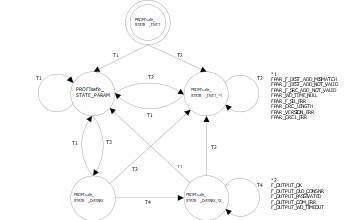
T1
Good F-Parameters received
T2
Bad F-Parameters received
T3
F-Host limit not reached
T4
Message processed
The state transitions T1 and T2 are executed immediately when new F-Parameters have been transferred for the F-Device instance. If the F-Source address limit for the SM560-S-FD-1 (max. 1 F-Source address) / SM560-S-FD-4 (max. 4 different F-Source addresses) is not yet reached, transition T3 switches immediately. If the F-Source address limit has been reached, active F-Device instances (PROFIsafe_STATE_DATAEX states) of an F-Host must be stopped by T1 or T2 transition.
The following table describes the meaning of each state:
|
Value of STATE output on PROFIsafe F-Device stack instance |
Meaning |
|---|---|
|
PROFIsafe_STATE_INIT |
Status after initialization of F-Device instances. |
|
PROFIsafe_STATE_FPAR_F_DEST_ADD_MISMATCH |
Parameterization error: F-Destination address does not correspond to the given value based on rotary address switch value on SM560-S-FD-1 / SM560-S-FD-4 safety CPU. Refer also to diagnosis |
|
PROFIsafe_STATE_FPAR_F_DEST_ADD_NOT_VALID |
Parameterization error: F-Destination address invalid. Refer also to diagnosis |
|
PROFIsafe_STATE_FPAR_F_SRC_ADD_NOT_VALID |
Parameterization error: F-Source address is invalid or overlapping with F-Source addresses of F-Host instances. Refer also to diagnosis |
|
PROFIsafe_STATE_FPAR_WD_TIME_NULL |
Parameterization error: Watchdog time set to zero. Refer also to diagnosis |
|
PROFIsafe_STATE_FPAR_F_SIL_ERR |
Parameterization error: Requested SIL is too high. Refer also to diagnosis |
|
PROFIsafe_STATE_FPAR_CRC_LENGTH |
Parameterization error: Required CRC length does not fit to the data length. Refer also to diagnosis |
|
PROFIsafe_STATE_FPAR_VERSION_ERR |
Parameterization error: PROFIsafe version error. Refer also to diagnosis |
|
PROFIsafe_STATE_FPAR_CRC1_ERR |
Parameterization error: CRC error in F-Parameters. Refer also to diagnosis |
|
PROFIsafe_STATE_PARAM |
F-Host limitation error: F-Parameters accepted, but the F-Device does not exchange data because of the F-Host limitation. No diagnosis message is available. If required, customized AC500 diagnosis message shall be generated. |
|
PROFIsafe_STATE_DATAEX |
F-Parameters are accepted, F-Device instance can exchange process data. |
|
PROFIsafe_STATE_DATAEX_F_OUTPUT_OK |
The PROFIsafe output telegram for F-Host is valid. |
|
PROFIsafe_STATE_DATAEX_F_OUTPUT_OLD_CONSNR |
The PROFIsafe output telegram for F-Host is valid with an old consecutive number. |
|
PROFIsafe_STATE_DATAEX_F_OUTPUT_PASSIVATED |
Communication error was detected or the F-Host sends "activate_FV" in PROFIsafe control byte. If required, customized AC500 diagnosis message shall be generated from the application (if PROFIsafe_STATE_DATAEX_F_OUTPUT_PASSIVATED is detected on STATE output of F-Device stack instance). |
|
PROFIsafe_STATE_DATAEX_F_OUTPUT_COM_ERR |
PROFIsafe error: CRC error in PROFIsafe output telegram is detected. If required, customized AC500 diagnosis message shall be generated from the application (if PROFIsafe_STATE_DATAEX_F_OUTPUT_COM_ERR is detected on STATE output of F-Device stack instance). |
|
PROFIsafe_STATE_DATAEX_F_OUTPUT_WD_TIMEOUT |
PROFIsafe error: Watchdog timeout detected. If required, customized AC500 diagnosis message shall be generated from the application (if PROFIsafe_STATE_DATAEX_F_OUTPUT_WD_TIMEOUT is detected on STATE output of F-Device stack instance). |