


Reset of the values and parameters
In some cases, it could be required to do a reset, e.g., for resetting of counter values, parameters etc.
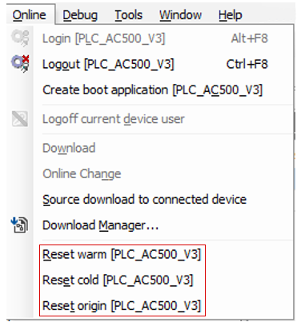
- Reset warm
-
All variables are reset, except RETAIN PERSISTENT variables.
- Reset cold
-
Causes initialization of all variables, except PERSISTENT variables. By recommended creation of remanent variables always with both properties: PERSISITENT and RETAIN, this command resets all variables, except PERSISTENT RETAIN variables.
- Reset origin
-
All variables and the application project are reset.
|
VAR |
VAR PERSISTENT RETAIN |
|
|---|---|---|
|
After online command 'Online change' |
no change |
no change |
|
After online command 'Download' |
initialization |
no change |
|
After online command 'Reset warm' |
initialization |
no change |
|
After online command 'Reset cold' |
initialization |
no change |
|
After online command 'Reset origin' |
initialization |
initialization |
|
After power supply off |
initialization |
no change |
Complete reset of the PLC
To do a complete reset of the PLC thereby erasing the application from the RAM and flash EEPROM do the following.
-
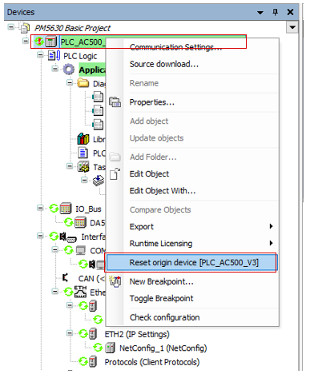
Right-click the station object “PLC_AC500_V3” in the device tree.
-
Select “Reset origin device [station name]”.
The application is completely erased from the PLC (complete project from all memory areas).