


For medium or large HA systems the configuration with communication interface modules and redundancy is done by the following steps. For details see the example documentations:
-
Install the hardware ⮫ “Hardware, requirements and options overview”.
-
Select the CPUs based on the requirements ⮫ “CPU choice, system size and performance indications”.
-
Install Automation Builder including the latest libraries ⮫ “Hardware, requirements and options overview”.
-
Install the Bulk Data Manager tool (BDM) ⮫ “How to get and install the AC500 High Availability system package”.
-
Create a new project in Automation Builder for the chosen CPUs.
-
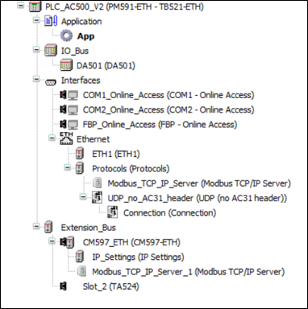
Configure the required Modbus and UDP configuration in the Automation Builder device tree of the CPU. UDP settings are only required in AC500 PLCs.
-
For UDP in AC500 PLC, configure “UDP_no_AC31_header” and define the port number as '3000'.

-
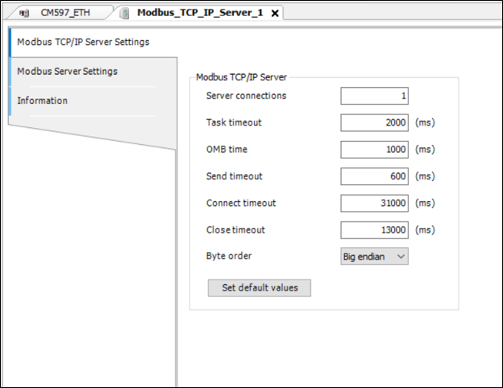
In AC500 PLCs for each CM597-ETH communication module added the “Send timeout” value has to be changed to 600 ms for the Modbus TCP server.
-
Assign the IP addresses in ³ 2 different Ethernet networks:
-
SCADA network: SCADA, connected PLC A and PLC B.
-
Field network: connected CI52x module(s).
-
-
Configure a network switch in the field network (if managed /redundant) based on network redundancy required ⮫ “Field I/O network topologies”.
-
Run BDM tool to configure CI52x network.
-
Export the files. Refer for details in the document: %ALLUSERSPROFILE%\Documents\Automation Builder Examples\PS5601-HA-MTCP\BulkDataManager\Documentation.
-
Import the Bulk data export files to the Automation Builder project.
-
Add Modbus TCP configuration for the ETH ports.
-
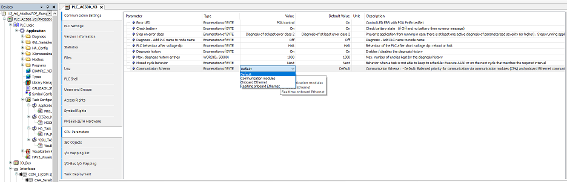
For the system with V3 PLCs, set the Communication Schema to “Onboard Ethernet” “CPU Parameters” for better performance.
-
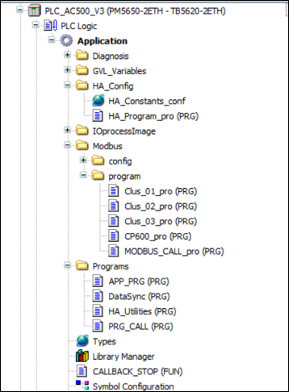
Add Callback stop function HA_MOD_CALLBACK_STOP and call it in the system event “stop”.
-
Add optional HA utility function blocks or function block HA_MOD_DATASYNC.
-
Add the task configuration ⮫ “Task configuration recommendations for HA system”.
-
Activate the runtime license if it is a V3 PLC to enable HA system⮫ “PLC runtime licensing”.
-
Compile and download to both PLCs (simplified in V3 via integrated download manager).
-
Create a boot project, restart the complete system and RUN.
-
Operation: Test use cases (e.g. by putting the primary PLC to STOP mode and observe the switchover).
-
For different use cases and behavior refer to 'Failures and use cases'⮫ “Failures and use cases”.
-
Runtime error and diagnosis function block can be used to monitor the system⮫ “Diagnosis”.