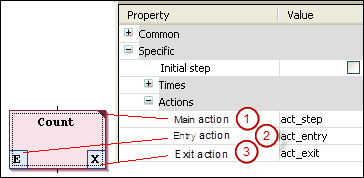
Step actions are actions which you can use to extend the IEC standard.
-
Entry action:
CODESYS executes this action after the step is activated and before the main action is executed.
You reference a new action, or an action created below the SFC object, from a step by means of the “Entry action” ⮫ element property (2). You can also add a new action to the step by means of the “Add Entry Action” command. The entry action is marked with an
Ein the lower left corner of the step box. -
Main action:
CODESYS executes this action when the step is active and any entry actions have already been processed. However, in contrast to IEC actions (see above), these step actions are not executed a second time when the step is deactivated. Moreover, you cannot use qualifiers here.
You add an existing action to a step by means of the “Main action” element property (1). You can create and add a new action by clicking the step element. A main action is marked with a filled triangle in the upper right corner of the step box.
-
Exit action:
CODESYS executes this action one time when the step is deactivated. However, note that an exit action is not executed in the same cycle, but at the beginning of the next cycle.
You reference a new action, or an action created below the SFC object, from a step by means of the “Exit action” element property (3). You can also add a new action to the step by means of the “Insert Exit Action” command. The exit action is marked with an
Xin the lower right corner of the step box.