


In DNP3, event buffer is a feature in outstation to store the event information temporarily. When an event is generated, outstation places the event data into the buffer, and it remains until the event have been transmitted to the master and receive is acknowledged.
Event buffer ensures the significant changes are not lost due to communication delay or other factors. Upon receipt of confirmation from the master, event information is permanently removed from the buffer. Each object group has the dedicated buffer queue for the events generated to be stored. The maximum events to be buffered with respect to event mode can be configured in the session user interface.
The fundamental concept of buffering is where the first data that enters the buffer is also the first to leave (FIFO). When an event is generated in outstation, it is added to the FIFO buffer in the same order of occurrence and the oldest event will be processed to report to master. Only one change of state for each point will be retained in the buffer. If a subsequent event occurs for a point, the earlier state will be overwritten with current state.
If buffer limit is reached its capacity, new events cannot be added and generates “Event buffer overflow” indication in outstation, until space is made available by processing some of the existing events.
-
Event buffer overflow: Outstation will set the buffer has overflowed through internal indication flag IIN2.3. User must ensure the event buffer size is configured properly to avoid loss of events.
-
Delete oldest event (Ring buffer): To handle the above situation, there is an option for the user to select Delete oldest event to enabled or disabled. If delete oldest event is enabled, once events in the buffer reached limit, the oldest event in the buffer will start to delete automatically to make room for new ones. If it is disabled, once buffer limit reached, all the new events will not be buffered.
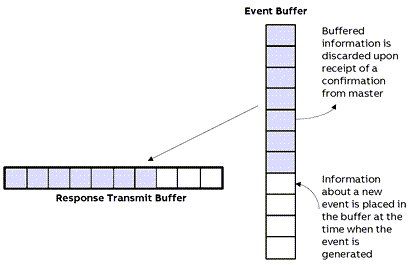
The following diagram is intended to illustrate concepts and does imply a required design.
-
The shaded area shows event objects in the buffer.
-
Event objects representing the events are put into a transmit buffer to create a response message.
Buffering in multi session:
Each session in outstation maintains its own buffer capacity with separate memory consumption to ensure the orderly processing and transmission of events.
Multi session with separate database configured – during event generation, same event will be buffered in all the sessions until reported to master respectively. If session 1 already transmitted the events to master, then those details will be deleted only from session 1. Whereas other sessions still hold those events.
Multi session with same database configured – during event generation, same event will be buffered in all the sessions until reported to master respectively. If session 1 already transmitted the events to master, then those details will be deleted only from session 1. Whereas other session 2 still hold those events until requested by respective master.
Buffering limits:
For each object group, maximum of 65535 events can be buffered per session. Users can adapt the limits for buffering in the session configuration.
Total events covering all object groups which can be buffered during disconnection is based on PLC type and the limits are as per below table.
|
PLC type |
Number of events |
|---|---|
|
PM5670/5-2ETH |
800,000 |
|
PM5650-2ETH |
350,000 |
|
PM5630-2ETH |
200,000 |
|
PM5092-2ETH |
350,000 |
|
PM5082-2ETH |
350,000 |
|
PM5072-2ETH |
200,000 |